We Get Around NetworkForms
Browse FormsPricingAbout
Sign inGet started
We Get Around Network

WGAN Forms

A library of business, legal, and operational templates built for real estate photographers, Matterport service providers, 3D capture specialists, and proptech professionals.

A product of We Get Around Network — the largest global community for real estate photographers and 3D capture pros.

Library

  • Browse forms
  • Pricing
  • Redeem promo code

Company

  • About
  • We Get Around Network
  • Legal disclaimer
  • Terms
  • Privacy

Disclaimer: All forms provided are templates for informational purposes only and do not constitute legal advice. Consult a qualified attorney before using any agreement in your business.

© 2026 We Get Around Network. All rights reserved.

Back to library
Job Intake & Workflow

Job Intake Sheet

Job Intake Sheet — WGAN 2026 form template.

Last updated Jul 7, 2026

Disclaimer: This template is for informational purposes only and is not legal advice. Have a qualified attorney review it before use.

What is the Job Intake Sheet?

The Job Intake Sheet is a WGAN 2026 master template designed for real estate photographers, 3D tour creators, and reality-capture professionals operating in the United States. It serves as an internal photographer record — completed at booking and referenced on capture day — that consolidates client contact details, property information, shoot scope, access instructions, deliverable selections, fees, required releases, and delivery notes into a single structured document.

When should you use this form?

The Job Intake Sheet should be completed every time a new shoot is booked — whether the job involves standard HDR photography, a Matterport or 3D virtual tour, drone capture, floor plans, or a combination of services. It is especially useful when juggling multiple clients per week, coordinating with listing agents or property managers, or delegating shoots to associate photographers who need a complete briefing document on arrival.
What's included in this template?

  • Booking and Job ID block with date, booker name, and underlying agreement reference
  • Client section capturing name, capacity, brokerage, MLS/Agent ID, and billing contact
  • Property details including address, square footage, bedrooms, lot size, and property type
  • Capture Plan with shoot date, start time, duration, weather note, entry method, and special access notes
  • Deliverables checklist covering HDR photos, 3D tours, drone, floor plans, and other capture types
  • Fee Summary section for line-item pricing and total job cost
  • Required Releases tracker linking to applicable WGAN release forms
  • Pre-Shoot Communication and Photographer Notes fields for internal coordination and delivery instructions

How do I fill out this form?

  1. Open the form at forms.wgan.info. Navigate to forms.wgan.info and locate the Job Intake Sheet under the Job Intake Sheet category. Click the template to open the online form in your browser.
  2. Enter booking and client details. Fill in the Job ID using the YYMMDD-CLIENTINITIALS-NN format, then complete all client fields including name, capacity, brokerage, phone, email, and MLS or Agent ID.
  3. Add property and capture plan information. Enter the property address, square footage, bedroom and bathroom count, and property type, then complete the Capture Plan fields including shoot date, start time, entry method, and any special access notes.
  4. Select deliverables and complete fee summary. Check all applicable deliverable types in Section 5, then fill in the Fee Summary with per-item pricing and the total job cost as agreed with the client.
  5. Note required releases and pre-shoot communications. Record which WGAN release forms apply to this job and log any pre-shoot communication details or internal photographer notes relevant to the capture day.
  6. Download and save the completed intake sheet. Once all sections are complete, use the download option to save the finished form as a PDF. Store it in the job file and reference it on capture day.

Preview

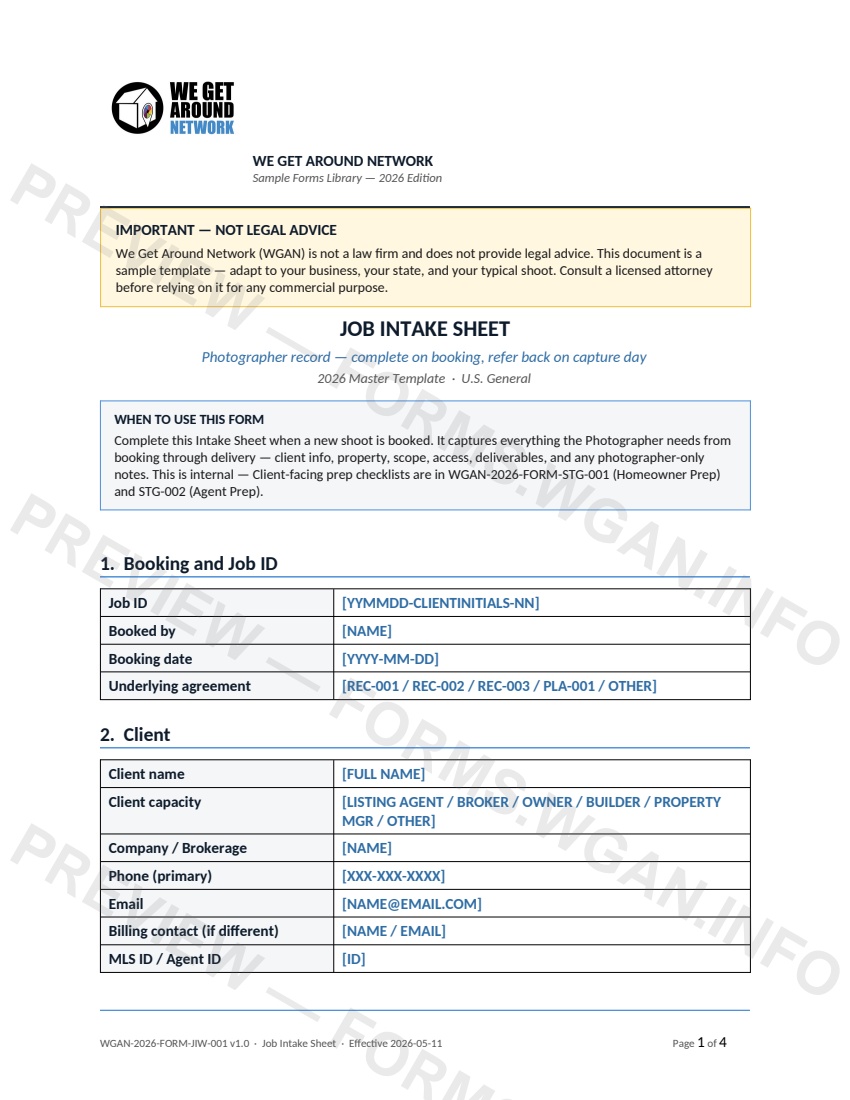
Job Intake Sheet — page 1 preview covering 1. Booking and Job ID, 2. Client, 3. Property
Page 1
Job Intake Sheet — page 2 preview covering 6. Fee Summary, 7. Required Releases, 8. Pre-Shoot Communication
Page 2

First 2 pages shown — watermarked. Subscribe to fill out and download the unbranded document.

What this form covers

IMPORTANT — NOT LEGAL ADVICE

We Get Around Network (WGAN) is not a law firm and does not provide legal advice. This document is a sample template — adapt to your business, your state, and your typical shoot. Consult a licensed attorney before relying on it for any commercial purpose.

JOB INTAKE SHEET

Photographer record — complete on booking, refer back on capture day

2026 Master Template · U.S. General

WHEN TO USE THIS FORM

Complete this Intake Sheet when a new shoot is booked. It captures everything the Photographer needs from booking through delivery — client info, property, scope, access, deliverables, and any photographer-only notes. This is internal — Client-facing prep checklists are in WGAN-2026-FORM-STG-001 (Homeowner Prep) and STG-002 (Agent Prep).

1. Booking and Job ID

Job ID

[YYMMDD-CLIENTINITIALS-NN]

Booked by

[NAME]

Booking date

[YYYY-MM-DD]

Underlying agreement

[REC-001 / REC-002 / REC-003 / PLA-001 / OTHER]

2. Client

Client name

[FULL NAME]

Client capacity

[LISTING AGENT / BROKER / OWNER / BUILDER / PROPERTY MGR / OTHER]

Company / Brokerage

[NAME]

Phone (primary)

[XXX-XXX-XXXX]

Email

[NAME@EMAIL.COM]

Billing contact (if different)

[NAME / EMAIL]

MLS ID / Agent ID

[ID]

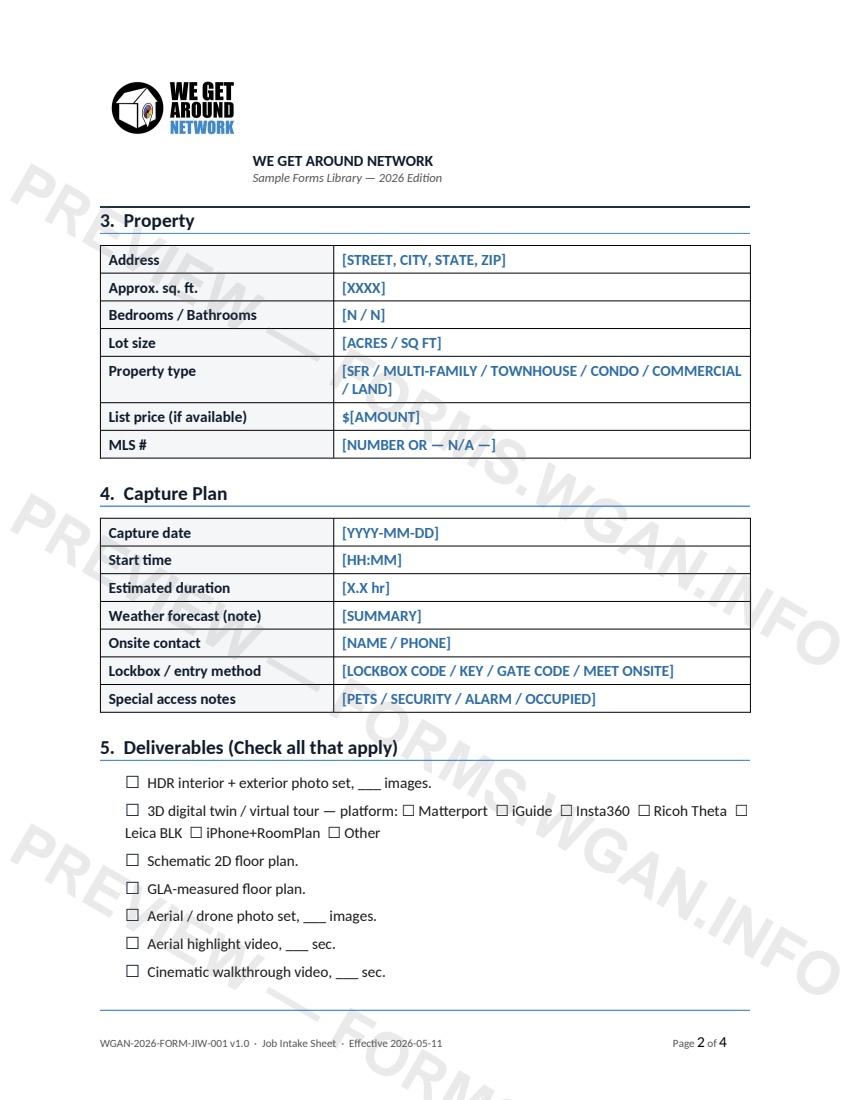
3. Property

Address

[STREET, CITY, STATE, ZIP]

Approx. sq. ft.

[XXXX]

Bedrooms / Bathrooms

[N / N]

Lot size

[ACRES / SQ FT]

Property type

[SFR / MULTI-FAMILY / TOWNHOUSE / CONDO / COMMERCIAL / LAND]

List price (if available)

$[AMOUNT]

MLS #

[NUMBER OR — N/A —]

4. Capture Plan

Capture date

[YYYY-MM-DD]

Start time

[HH:MM]

Estimated duration

[X.X hr]

Weather forecast (note)

[SUMMARY]

Onsite contact

[NAME / PHONE]

Lockbox / entry method

[LOCKBOX CODE / KEY / GATE CODE / MEET ONSITE]

Special access notes

[PETS / SECURITY / ALARM / OCCUPIED]

5. Deliverables (Check all that apply)

☐ HDR interior + exterior photo set, ___ images.

…

Table of contents

  1. 1. Booking and Job ID
  2. 2. Client
  3. 3. Property
  4. 4. Capture Plan
  5. 5. Deliverables (Check all that apply)
  6. 6. Fee Summary
  7. 7. Required Releases
  8. 8. Pre-Shoot Communication
  9. 9. Photographer Notes
  10. 10. Delivery and Close

Authoritative references

Official sources to consult when customizing this template. These supplement, but do not replace, advice from a qualified attorney licensed in your jurisdiction.

  • NIBS — National Institute of Building Sciences

    Standards and best practices for building documentation and digital twins.

Fill out this form

Subscribers only

Subscribe at $19/mo (or $149/yr) to fill any form online and download the completed PDF unlimited.

Sign in to subscribeSee pricing

Related forms in Job Intake & Workflow

Other templates capture pros use alongside this one.

See all in Job Intake & Workflow →
Job Intake & Workflow

QA / Delivery Checklist

A pre-delivery QA checklist for real estate photographers and 3D tour creators to verify every deliverable before sending to the client.

#qa#delivery#checklist
View form
Job Intake & Workflow

Twilight Blue Hour Request

A specialized shoot-request contract for real estate photographers covering twilight/blue-hour timing precision, extra fees, weather cancellation, and re-shoot policies.

#twilight#blue-hour#request
View form
Job Intake & Workflow

Reshoot Request

A structured reshoot request form for real estate photographers and tour creators to document scope changes, apply the correct rate tier, and confirm turnaround commitments.

#reshoot#request#workflow
View form
Job Intake & Workflow

Property Access & Lockbox Details

A job-intake form listing agents complete to give real estate photographers secure, accurate property-access details before every shoot.

#property-access#lockbox#workflow
View form