We Get Around NetworkForms
Browse FormsPricingAbout
Sign inGet started
We Get Around Network

WGAN Forms

A library of business, legal, and operational templates built for real estate photographers, Matterport service providers, 3D capture specialists, and proptech professionals.

A product of We Get Around Network — the largest global community for real estate photographers and 3D capture pros.

Library

  • Browse forms
  • Pricing
  • Redeem promo code

Company

  • About
  • We Get Around Network
  • Legal disclaimer
  • Terms
  • Privacy

Disclaimer: All forms provided are templates for informational purposes only and do not constitute legal advice. Consult a qualified attorney before using any agreement in your business.

© 2026 We Get Around Network. All rights reserved.

Back to library
Job Intake & Workflow

Property Access & Lockbox Details

A job-intake form listing agents complete to give real estate photographers secure, accurate property-access details before every shoot.

Last updated Jul 7, 2026

Disclaimer: This template is for informational purposes only and is not legal advice. Have a qualified attorney review it before use.

What is the Property Access & Lockbox Details?

The Property Access & Lockbox Details form is a job-intake document that listing agents complete before a real estate photography or 3D tour shoot. It consolidates property address, MLS number, entry-point instructions, lockbox codes, alarm disarm sequences, garage access, pet warnings, and restricted areas into a single structured submission. Photographers receive every access credential and site-specific detail they need before arriving, reducing shoot-day delays, accidental alarm triggers, and miscommunication between agents and photographers.

When should you use this form?

Use the Property Access & Lockbox Details form any time a listing agent — rather than a homeowner — is coordinating access for a real estate photo shoot, Matterport 3D tour, or reality-capture session. It is especially important when the photographer will enter an occupied or alarmed property without the agent present, when a lockbox or gate code must be transmitted securely, or when pets, restricted rooms, or a building lobby create access complexity that a simple text message cannot reliably capture.
What's included in this template?

  • Full property address, MLS number, and property type fields
  • Listing agent contact details and a backup emergency contact
  • Preferred shoot time windows with date and time fields
  • Entry point selection (front, rear, side, garage, lobby, or other) with turn-by-turn directions
  • Dedicated fields for gate code, lockbox location, and lockbox code
  • Alarm system details: panel location, disarm sequence, monitoring company, and re-arm instructions
  • Pet presence confirmation and room-by-room containment plan
  • Restricted areas and items list with optional reason field
  • Agent confirmation statement asserting code accuracy and access authority

How do I fill out this form?

  1. Open the form at forms.wgan.info. Navigate to forms.wgan.info and locate the Property Access & Lockbox Details template in the job-intake category. Click the form title to open the online fill-in version.
  2. Enter property and agent information. Type the full property address, MLS number, property type, and the listing agent's name, email, and mobile number into the corresponding fields in the Property Information section.
  3. Complete access and alarm sections. Select the entry point from the dropdown, paste gate and lockbox codes into their dedicated fields, then fill in the alarm panel location, step-by-step disarm sequence, and monitoring company contact.
  4. Add pet, restricted-area, and shoot-time details. Confirm pet presence and describe the containment plan, list any rooms or items excluded from photos or the 3D tour, and enter the preferred shoot date and time window.
  5. Submit the agent confirmation. Review all entries for accuracy, then submit the form. The agent's submission records their confirmation that all codes are current and that they hold authority to grant property access.
  6. Download and share the completed form. After submission, download the completed PDF from forms.wgan.info and send a copy to the photographer as the official shoot-day access brief.

Preview

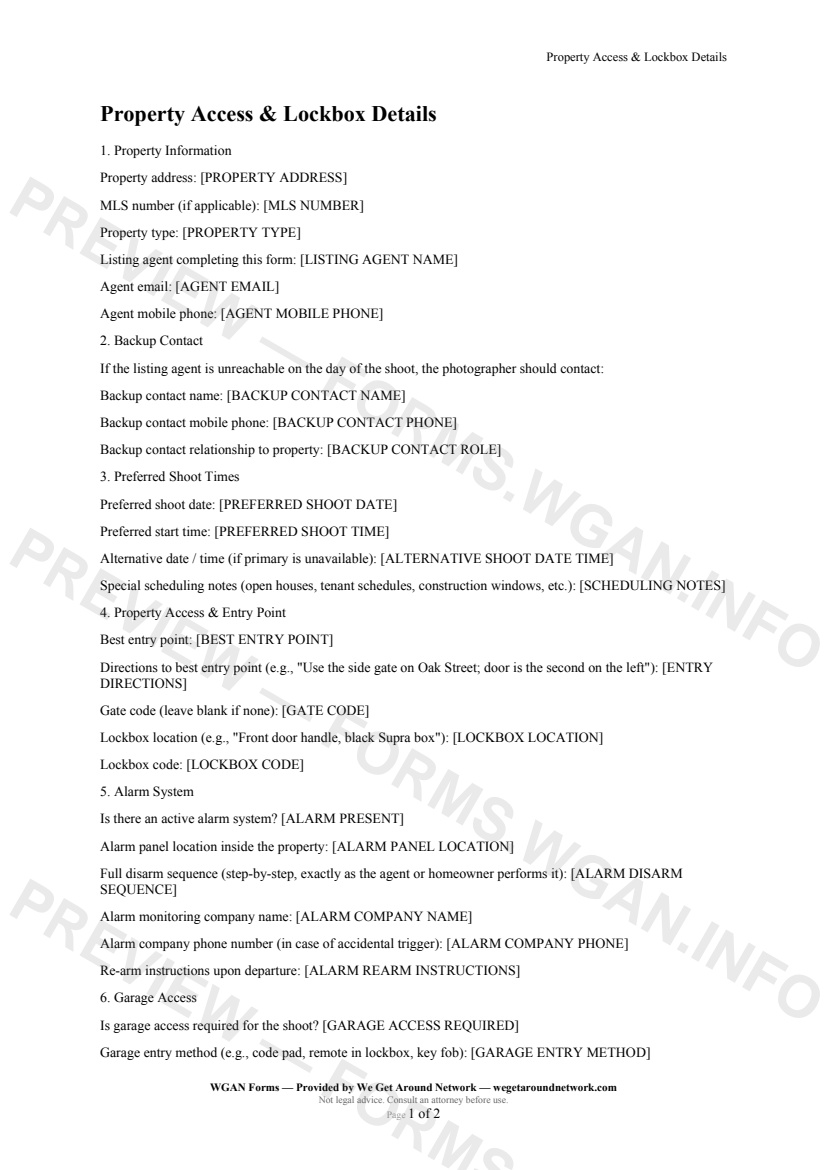
Property Access & Lockbox Details — page 1 preview covering Property Information, Backup Contact, Preferred Shoot Times
Page 1
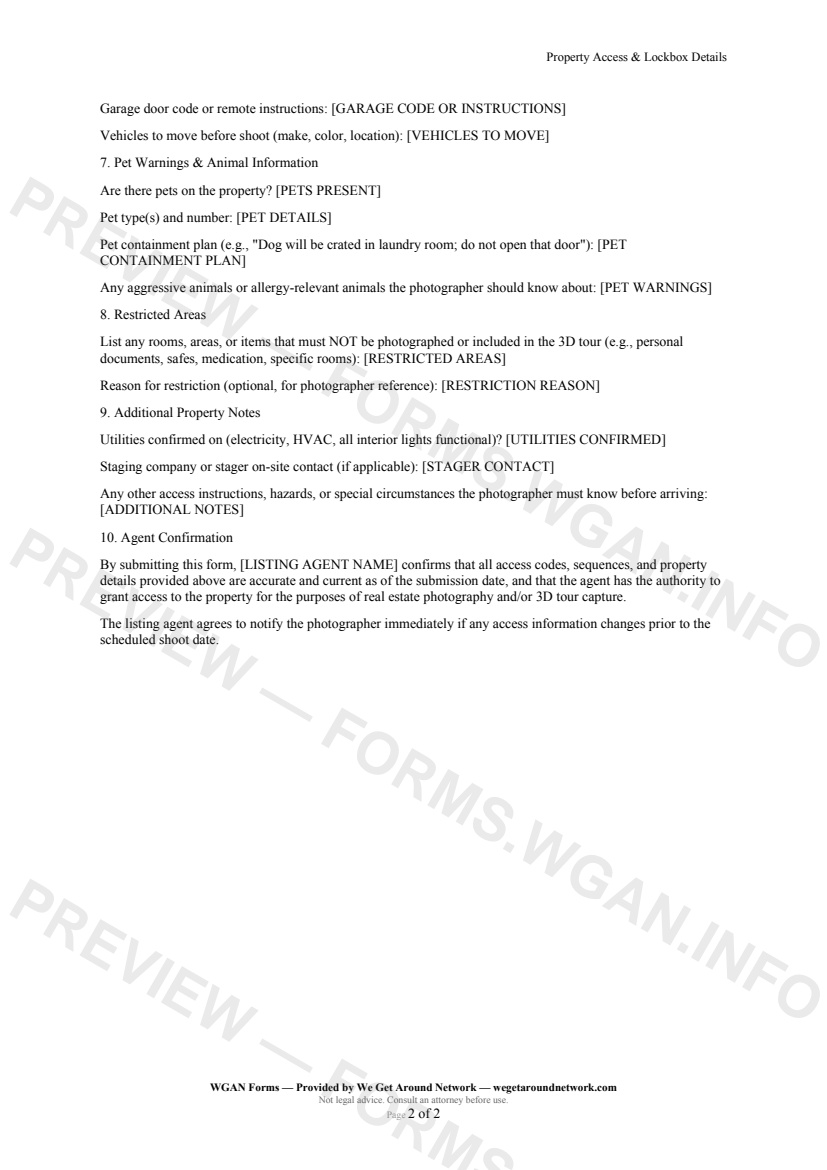
Property Access & Lockbox Details — page 2 preview covering Garage Access, Pet Warnings & Animal Information, Restricted Areas
Page 2

First 2 pages shown — watermarked. Subscribe to fill out and download the unbranded document.

What this form covers

Property Information

Capture the full property address, MLS number, and property type in one place — so your shoot brief and delivered files are always tagged correctly from day one.

The listing agent's name, email, and mobile phone are locked in at submission, giving you a single source of truth if anything changes on shoot day.

---

Property Access & Entry Point

Choose the best entry point from a simple dropdown — front, side, rear, garage, building lobby, or other — and add turn-by-turn directions the photographer can follow without a prior site visit.

Gate code, lockbox location, and lockbox code each have their own dedicated field, stored securely and visible only to the receiving photographer.

---

Alarm System

This is where most shoot-day disasters are prevented. The form captures:

  • Whether an active alarm system is present - Exact panel location inside the property - The full disarm sequence, written step-by-step exactly as the agent or homeowner performs it - Alarm monitoring company name and emergency phone number - Re-arm instructions the photographer follows on departure

One accidental trigger costs more in time and trust than the entire shoot fee. This section removes that risk.

---

Pet Warnings & Animal Information

Agents confirm whether pets are present, describe the containment plan room by room, and flag any aggressive or allergy-relevant animals — protecting both the photographer and the homeowner.

---

Restricted Areas

List every room, item, or area that must not appear in photos or the 3D tour: personal documents, safes, medication, a home-office whiteboard. An optional reason field gives the photographer context without it ever being published.

---

Agent Confirmation

The agent's submission acts as a confirmation that all codes and details are accurate and current, and that they hold authority to grant access — giving your liability chain a clean, documented starting point.

Table of contents

  1. Property Information
  2. Backup Contact
  3. Preferred Shoot Times
  4. Property Access & Entry Point
  5. Alarm System
  6. Garage Access
  7. Pet Warnings & Animal Information
  8. Restricted Areas
  9. Additional Property Notes
  10. Agent Confirmation

What's included

  • Full property address and MLS number capture
  • Gate code, lockbox location, and lockbox code fields
  • Step-by-step alarm disarm and re-arm sequence
  • Best entry point selection with turn-by-turn directions
  • Garage access method and door code
  • Pet warnings, containment plan, and allergy alerts
  • Restricted rooms and do-not-photograph areas
  • Primary listing agent and backup contact details
  • Preferred and alternative shoot date/time slots
  • Utilities confirmation and staging contact fields
#property-access#lockbox#workflow#intake

Authoritative references

Official sources to consult when customizing this template. These supplement, but do not replace, advice from a qualified attorney licensed in your jurisdiction.

  • NIBS — National Institute of Building Sciences

    Standards and best practices for building documentation and digital twins.

Fill out this form

Subscribers only

Subscribe at $19/mo (or $149/yr) to fill any form online and download the completed PDF unlimited.

Sign in to subscribeSee pricing

Related forms in Job Intake & Workflow

Other templates capture pros use alongside this one.

See all in Job Intake & Workflow →
Job Intake & Workflow

QA / Delivery Checklist

A pre-delivery QA checklist for real estate photographers and 3D tour creators to verify every deliverable before sending to the client.

#qa#delivery#checklist
View form
Job Intake & Workflow

Twilight Blue Hour Request

A specialized shoot-request contract for real estate photographers covering twilight/blue-hour timing precision, extra fees, weather cancellation, and re-shoot policies.

#twilight#blue-hour#request
View form
Job Intake & Workflow

Reshoot Request

A structured reshoot request form for real estate photographers and tour creators to document scope changes, apply the correct rate tier, and confirm turnaround commitments.

#reshoot#request#workflow
View form
Job Intake & Workflow

Job Intake Sheet

Job Intake Sheet — WGAN 2026 form template.
View form