We Get Around NetworkForms
Browse FormsPricingAbout
Sign inGet started
We Get Around Network

WGAN Forms

A library of business, legal, and operational templates built for real estate photographers, Matterport service providers, 3D capture specialists, and proptech professionals.

A product of We Get Around Network — the largest global community for real estate photographers and 3D capture pros.

Library

  • Browse forms
  • Pricing
  • Redeem promo code

Company

  • About
  • We Get Around Network
  • Legal disclaimer
  • Terms
  • Privacy

Disclaimer: All forms provided are templates for informational purposes only and do not constitute legal advice. Consult a qualified attorney before using any agreement in your business.

© 2026 We Get Around Network. All rights reserved.

Back to library
Job Intake & Workflow

QA / Delivery Checklist

A pre-delivery QA checklist for real estate photographers and 3D tour creators to verify every deliverable before sending to the client.

Last updated Jul 7, 2026

Disclaimer: This template is for informational purposes only and is not legal advice. Have a qualified attorney review it before use.

What is the QA / Delivery Checklist?

The QA / Delivery Checklist is a structured pre-delivery verification form for real estate photographers, 3D tour creators, and reality-capture professionals. It walks through nine sequential sections — from job identification and file naming to licensing attachments and the final delivery email — ensuring every deliverable meets agreed standards before it reaches the client. The checklist creates a timestamped paper trail for each job and catches errors such as file count mismatches, sky-replacement halos, and missing license documents before they cause client disputes.

When should you use this form?

The QA / Delivery Checklist should be used immediately after post-processing is complete and before any delivery link or email is sent to a client. It is especially relevant when a job includes multiple deliverable types — still images, a Matterport or iGUIDE 3D tour, and video — or when virtual staging, sky replacement, or licensed drone footage is involved. It is also appropriate when a studio employs editors or contractors whose output needs a standardized sign-off before the photographer's name goes on the delivery.
What's included in this template?

  • Job identification fields: photographer, client, address, order reference, and dates
  • File naming convention audit with expected vs. actual exported file count comparison
  • Image QC pass covering white balance, keystoning, sky replacements, and virtual staging masks
  • Watermark and proof-stamp removal confirmation for all final exports
  • 100% pixel-level review with configurable sample percentage setting
  • 3D tour link verification on desktop and mobile, with scan alignment and room-label checks
  • Video playback review for jump cuts, audio sync, and color grading continuity
  • Licensing and legal attachment confirmation with named document placement in delivery folder
  • Cloud backup, shareable folder link test, and delivery email draft review checklist

How do I fill out this form?

  1. Open the form at forms.wgan.info. Navigate to forms.wgan.info and locate the QA / Delivery Checklist under the Real Estate Photography category. Click the template to open the online form in your browser.
  2. Enter job identification details. Fill in the photographer or studio name, client name, property address, order reference number, shoot date, and delivery due date to anchor the checklist to the specific job.
  3. Complete each QA section in order. Work through all nine sections sequentially — file naming, image editing, 3D tour, video, licensing, backup, folder, and delivery email — checking off each item as it is verified.
  4. Record file counts and sample review percentage. Enter the expected file count from the scope of work and the actual exported count, then specify the sample percentage used for the pixel-level image review so the record is precise.
  5. Apply final sign-off. Complete the Final Sign-Off section by entering the reviewer's name, role, and sign-off date, confirming all sections have been reviewed and the job is cleared for delivery.
  6. Download and save the completed checklist. Click the download button to export the completed checklist as a PDF. Save it to the job folder alongside the deliverables as a permanent, timestamped QA record.

Preview

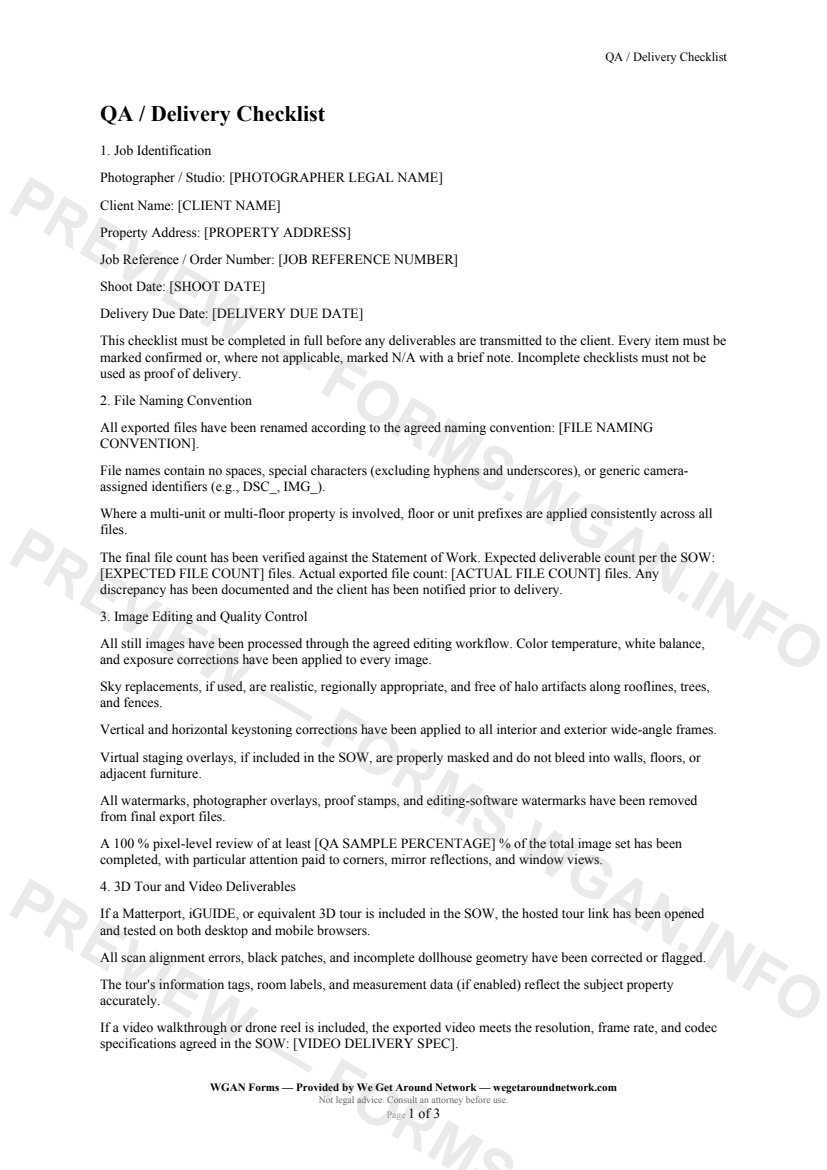
QA / Delivery Checklist — page 1 preview covering Job Identification, File Naming Convention, Image Editing and Quality Control
Page 1
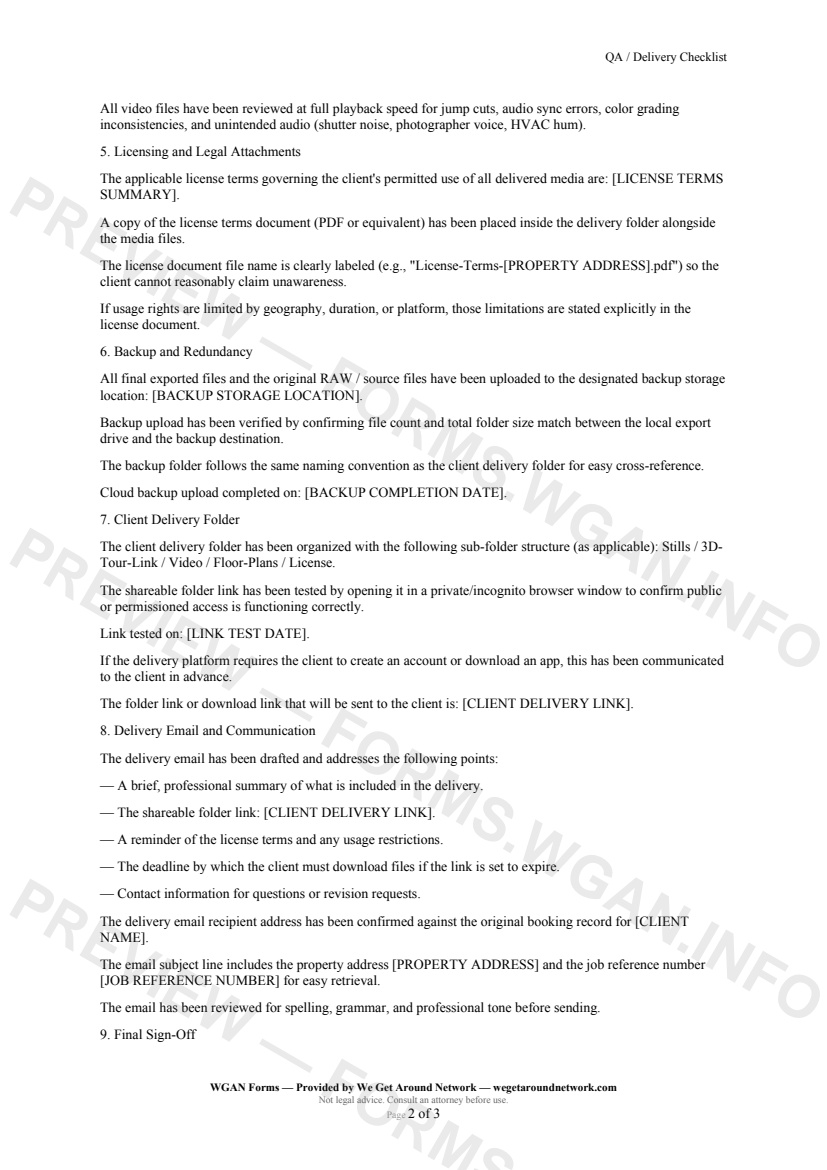
QA / Delivery Checklist — page 2 preview covering Backup and Redundancy, Client Delivery Folder, Delivery Email and Communication
Page 2

First 2 pages shown — watermarked. Subscribe to fill out and download the unbranded document.

What this form covers

Job Identification

Every checklist begins by anchoring the record to a specific job: photographer or studio name, client name, property address, and an order reference number. Shoot date and delivery due date are captured so you always have a timestamped paper trail.

---

File Naming Convention

Before a single file leaves your hard drive, this section asks you to confirm that every exported file follows your agreed naming convention — no generic camera identifiers (IMG_, DSC_), no spaces, no rogue special characters. Critically, the **expected file count from the SOW** is compared against the **actual exported file count**, so count mismatches are caught here, not in the client's inbox.

---

Image Editing and Quality Control

Work through a structured visual pass covering:

  • Color temperature, white balance, and exposure applied to every frame - Sky replacements checked for halo artifacts along rooflines and trees - Keystoning corrections applied to wide-angle interiors and exteriors - Virtual staging masks verified — no bleed onto walls or floors - **All watermarks and proof stamps removed** from final exports - A 100 % pixel-level review completed on a configurable sample percentage of the total image set

---

3D Tour and Video Deliverables

If a Matterport, iGUIDE, or equivalent hosted tour is in scope, you'll confirm the link opens on both desktop and mobile, scan alignment errors are resolved, and room labels are accurate. Video files are reviewed at full playback speed for jump cuts, audio sync issues, and color grading breaks.

---

Licensing and Legal Attachments

A plain-language summary of the license terms is recorded, and a copy of the license document is confirmed as placed inside the delivery folder — named clearly so the client can't claim they never saw it.

---

Backup, Folder, and Delivery Email

Final sections walk you through verifying the cloud backup completed successfully, testing the shareable folder link in an incognito window, and reviewing the draft delivery email for the property address, job reference, license reminder, and professional tone — before you hit send.

Table of contents

  1. Job Identification
  2. File Naming Convention
  3. Image Editing and Quality Control
  4. 3D Tour and Video Deliverables
  5. Licensing and Legal Attachments
  6. Backup and Redundancy
  7. Client Delivery Folder
  8. Delivery Email and Communication
  9. Final Sign-Off

What's included

  • File naming convention and SOW file-count verification
  • Image editing, sky replacement, and watermark removal checks
  • 3D tour (Matterport / iGUIDE) desktop and mobile link testing
  • Video resolution, frame rate, and codec compliance review
  • License terms document attachment and folder placement
  • Backup upload verification with date stamp
  • Client folder link tested in incognito browser
  • Delivery email structure and content checklist
  • Photographer sign-off with completion date
#qa#delivery#checklist#quality-control

Authoritative references

Official sources to consult when customizing this template. These supplement, but do not replace, advice from a qualified attorney licensed in your jurisdiction.

  • NIBS — National Institute of Building Sciences

    Standards and best practices for building documentation and digital twins.

Fill out this form

Subscribers only

Subscribe at $19/mo (or $149/yr) to fill any form online and download the completed PDF unlimited.

Sign in to subscribeSee pricing

Related forms in Job Intake & Workflow

Other templates capture pros use alongside this one.

See all in Job Intake & Workflow →
Job Intake & Workflow

Job Intake Sheet

Job Intake Sheet — WGAN 2026 form template.

View form
Job Intake & Workflow

Twilight Blue Hour Request

A specialized shoot-request contract for real estate photographers covering twilight/blue-hour timing precision, extra fees, weather cancellation, and re-shoot policies.

#twilight#blue-hour#request
View form
Job Intake & Workflow

Reshoot Request

A structured reshoot request form for real estate photographers and tour creators to document scope changes, apply the correct rate tier, and confirm turnaround commitments.

#reshoot#request#workflow
View form
Job Intake & Workflow

Property Access & Lockbox Details

A job-intake form listing agents complete to give real estate photographers secure, accurate property-access details before every shoot.
#property-access#lockbox#workflow
View form