We Get Around NetworkForms
Browse FormsPricingAbout
Sign inGet started
We Get Around Network

WGAN Forms

A library of business, legal, and operational templates built for real estate photographers, Matterport service providers, 3D capture specialists, and proptech professionals.

A product of We Get Around Network — the largest global community for real estate photographers and 3D capture pros.

Library

  • Browse forms
  • Pricing
  • Redeem promo code

Company

  • About
  • We Get Around Network
  • Legal disclaimer
  • Terms
  • Privacy

Disclaimer: All forms provided are templates for informational purposes only and do not constitute legal advice. Consult a qualified attorney before using any agreement in your business.

© 2026 We Get Around Network. All rights reserved.

Back to library
Video Production

Script Storyboard Template

A pre-structured script and storyboard template for real estate video shoots, covering property intro, kitchen, primary bedroom, outdoor, and closing scenes with timing and voiceover cues.

Last updated Jul 7, 2026

Disclaimer: This template is for informational purposes only and is not legal advice. Have a qualified attorney review it before use.

What is the Script Storyboard Template?

The Script Storyboard Template is a pre-structured planning document for real estate video shoots, covering five property scenes — introduction, kitchen, primary bedroom, outdoor/exterior, and closing — along with a total runtime summary and client sign-off section. Each scene includes fields for shot type, recommended duration, voiceover cue, director notes, and music fade points. The template is designed for real estate photographers, 3D tour creators, and reality-capture professionals who need a repeatable, client-ready production planning workflow.

When should you use this form?

Use the Script Storyboard Template before arriving on location for any real estate video shoot where the deliverable includes a narrated walkthrough, drone footage, or a branded closing sequence. It is especially useful when coordinating with a separate editor or videographer, when a listing agent requires pre-shoot approval, or when billing by scene to justify production time. It is also appropriate for operators who need to document FAA Part 107 or Transport Canada RPAS drone compliance directly within their shoot plan.
What's included in this template?

  • Project identification fields (property address, shoot date, client name)
  • Property Introduction Scene with exterior/drone shot cues and voiceover field
  • Kitchen Scene with counter-level shot notes and staging pitfall reminders
  • Primary Bedroom Scene with window-light and closet-reveal shot guidance
  • Outdoor and Exterior Features Scene with drone ascent, orbit, and airspace compliance fields
  • Closing and Call-to-Action Scene with branded fade-to-black and agent contact overlay fields
  • Total Runtime Summary referencing all scene durations
  • Client Approval and Sign-Off section for pre-shoot authorization

How do I fill out this form?

  1. Open the template at forms.wgan.info. Navigate to forms.wgan.info, locate the Script Storyboard Template in the Real Estate Video or Production Planning category, and click the template to open it in the online form builder.
  2. Enter project identification details. Fill in the property address, shoot date, client name, and any relevant project ID fields at the top of the form to tie the storyboard to a specific listing.
  3. Complete each scene section in order. Work through Scenes 1–5 sequentially, entering shot type, recommended duration in seconds, voiceover copy, director notes, and music fade-point timing for each scene.
  4. Select drone certification type if applicable. In the Outdoor and Exterior Features Scene, choose the applicable drone certification — FAA Part 107, Transport Canada RPAS, or another listed option — to log airspace compliance within the document.
  5. Review the Total Runtime Summary. Check the Total Runtime Summary section to confirm that all scene durations are captured and that the projected final cut length matches the agreed deliverable before submitting to the client.
  6. Download and share the completed storyboard. Click the download or export button to save the completed storyboard as a PDF, then share it with the client to collect their signature in the Client Approval and Sign-Off section.

Preview

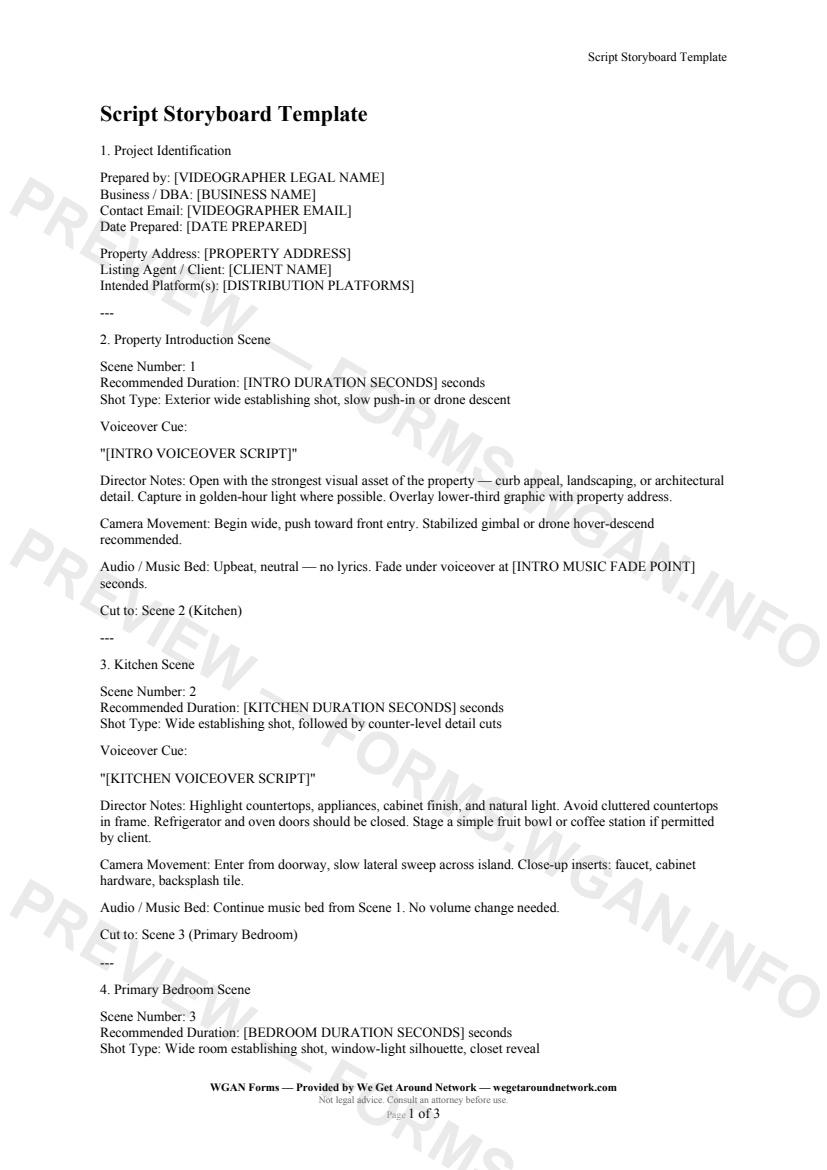
Script Storyboard Template — page 1 preview covering Project Identification, Property Introduction Scene, Kitchen Scene
Page 1
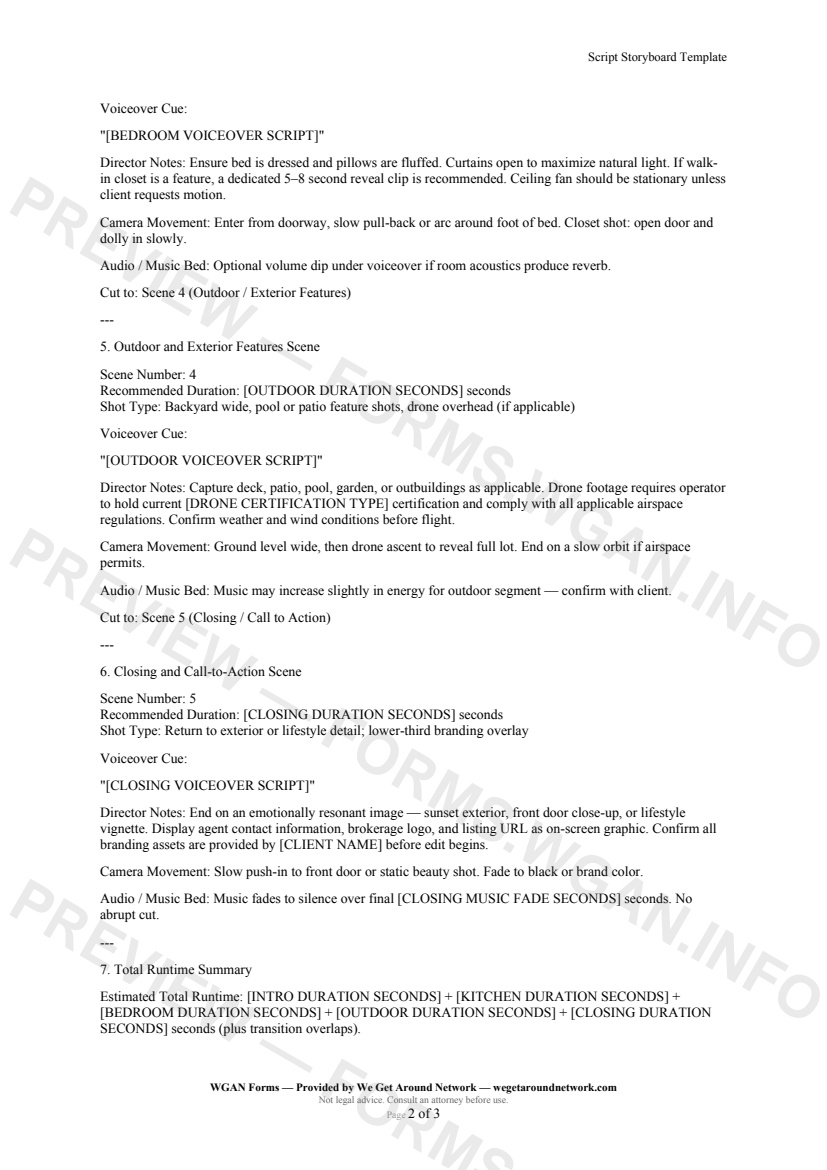
Script Storyboard Template — page 2 preview covering Outdoor and Exterior Features Scene, Closing and Call-to-Action Scene, Total Runtime Summary
Page 2

First 2 pages shown — watermarked. Subscribe to fill out and download the unbranded document.

What this form covers

Property Introduction Scene

The storyboard opens with **Scene 1 — Property Intro**, built around an exterior wide establishing shot or drone descent. You fill in the recommended duration (typically 15–25 seconds) and drop your voiceover copy directly into the cue field:

> *"[INTRO VOICEOVER SCRIPT]"*

Director notes remind you to capture golden-hour light and overlay a lower-third address graphic. A dedicated music-fade-point field lets your editor know exactly when the bed should dip under the narration.

---

Kitchen Scene

**Scene 2** guides you through a counter-level walk of the kitchen's headline features — countertops, appliances, cabinet finish, and natural light. Voiceover copy is entered once and flows straight into the finished edit. Notes flag common pitfalls: cluttered countertops, open refrigerator doors, and missing staging props.

---

Primary Bedroom Scene

**Scene 3** covers the primary bedroom with shot notes for the window-light silhouette and walk-in closet reveal. The template prompts you to note whether the ceiling fan should be stationary and reminds you to account for room reverb in your audio mix.

---

Outdoor and Exterior Features Scene

**Scene 4** is built for drone-capable operators. It includes:

  • Backyard wide and patio feature shots - Drone ascent-to-overhead and orbit guidance - A **drone certification type** selector (FAA Part 107, Transport Canada RPAS, and more) - Airspace compliance reminder baked into director notes

---

Closing and Call-to-Action Scene

**Scene 5** ties everything together with a branded fade-to-black, on-screen agent contact details, and a music fade-out field so the editor knows exactly how many seconds the outro music should run.

The **Total Runtime Summary** section automatically references every scene duration so you — and your client — can see the projected final cut length before a single frame is captured.

Table of contents

  1. Project Identification
  2. Property Introduction Scene
  3. Kitchen Scene
  4. Primary Bedroom Scene
  5. Outdoor and Exterior Features Scene
  6. Closing and Call-to-Action Scene
  7. Total Runtime Summary
  8. Client Approval and Sign-Off

What's included

  • Pre-structured five-scene real estate video storyboard
  • Per-scene timing slots with recommended durations
  • Fillable voiceover / narration cue fields for each scene
  • Camera movement and director notes for every scene
  • Music bed and audio fade guidance throughout
  • Drone certification and compliance reminder for outdoor scenes
  • Delivery format, deadline, and file transfer fields
  • Client sign-off and revision window terms
#script#storyboard#video#template

Fill out this form

Subscribers only

Subscribe at $19/mo (or $149/yr) to fill any form online and download the completed PDF unlimited.

Sign in to subscribeSee pricing

Related forms in Video Production

Other templates capture pros use alongside this one.

See all in Video Production →
Video Production

Video Delivery & Usage Rights Addendum

Video Delivery & Usage Rights Addendum — WGAN 2026 form template.

View form
Video Production

Video Production Agreement

Video Production Agreement — WGAN 2026 form template.

View form
Video Production

Video Shot List

Video Shot List — WGAN 2026 form template.

View form
Video Production

Agent On-Camera Talent Agreement

A talent agreement for real estate photographers hiring agents to appear on-camera in video walkthroughs, covering likeness rights, wardrobe, script approval, retakes, and residuals.
#talent#on-camera#agent
View form