We Get Around NetworkForms
Browse FormsPricingAbout
Sign inGet started
We Get Around Network

WGAN Forms

A library of business, legal, and operational templates built for real estate photographers, Matterport service providers, 3D capture specialists, and proptech professionals.

A product of We Get Around Network — the largest global community for real estate photographers and 3D capture pros.

Library

  • Browse forms
  • Pricing
  • Redeem promo code

Company

  • About
  • We Get Around Network
  • Legal disclaimer
  • Terms
  • Privacy

Disclaimer: All forms provided are templates for informational purposes only and do not constitute legal advice. Consult a qualified attorney before using any agreement in your business.

© 2026 We Get Around Network. All rights reserved.

Back to library
Job Intake & Workflow

Rush Order Form

A job-intake rush order form for real estate photographers and 3D tour providers to document expedited turnaround requests, rush fees, and delivery constraints.

Last updated Jul 7, 2026

Disclaimer: This template is for informational purposes only and is not legal advice. Have a qualified attorney review it before use.

What is the Rush Order Form?

The Rush Order Form is a job-intake agreement for real estate photographers and 3D tour providers that documents expedited-turnaround requests alongside a standard shoot confirmation. It establishes a tiered rush-fee schedule, locks in a precise delivery deadline, defines file-format and deliverable-count constraints, and limits the photographer's liability to the surcharge portion only — keeping the base service agreement intact while adding rush-specific protections.

When should you use this form?

Use the Rush Order Form whenever a real estate client requests delivery faster than the standard turnaround — typically 24, 48, or 72 hours. It is especially relevant before listing-deadline shoots, same-day open-house requests, or any job where reprioritizing existing workload or sourcing additional editing resources is required. The form should be signed by the client before production begins.
What's included in this template?

  • Acceptance and scope clause supplementing an existing shoot confirmation
  • Tiered rush-fee schedule: 25%, 50%, and 100% surcharges tied to 72-, 48-, and 24-hour windows
  • Non-refundable rush-fee provision once production commences
  • Delivery deadline field capturing exact date and time
  • File-format availability and maximum deliverable file count for the rush window
  • Matterport and iGUIDE platform-processing carve-out outside photographer control
  • Exclusion clause for drone footage, virtual staging, twilight conversions, and sky replacement
  • Liability cap limiting exposure to surcharge-only refund, excluding consequential damages
  • Late-access extension clause with rush-fee forfeiture and re-shoot fee provision
  • Governing law, dispute resolution, and signatures section

How do I fill out this form?

  1. Open the form at forms.wgan.info. Navigate to forms.wgan.info and locate the Rush Order Form in the job-intake category. Click the form title to open the online editor in your browser.
  2. Enter client and property details. Fill in the client name, subject property address, and shoot date. These fields populate the Acceptance and Scope section and link the rush agreement to the correct job.
  3. Select a turnaround tier and enter the base fee. Choose the 24-, 48-, or 72-hour turnaround option. Enter the standard base fee; the form automatically calculates the applicable surcharge and displays the total rush fee in dollars.
  4. Set the delivery deadline and format constraints. Enter the exact delivery date and time, select available file formats, and specify the maximum deliverable file count permitted within the compressed window.
  5. Review exclusions and liability fields. Confirm which specialty services — drone footage, virtual staging, sky replacement — are excluded from the rush scope, and verify the liability-cap language reflects the surcharge amount entered.
  6. Download and send the completed form. Click the download button to save the populated PDF to your device. Share it with the client for signature before beginning production.

Preview

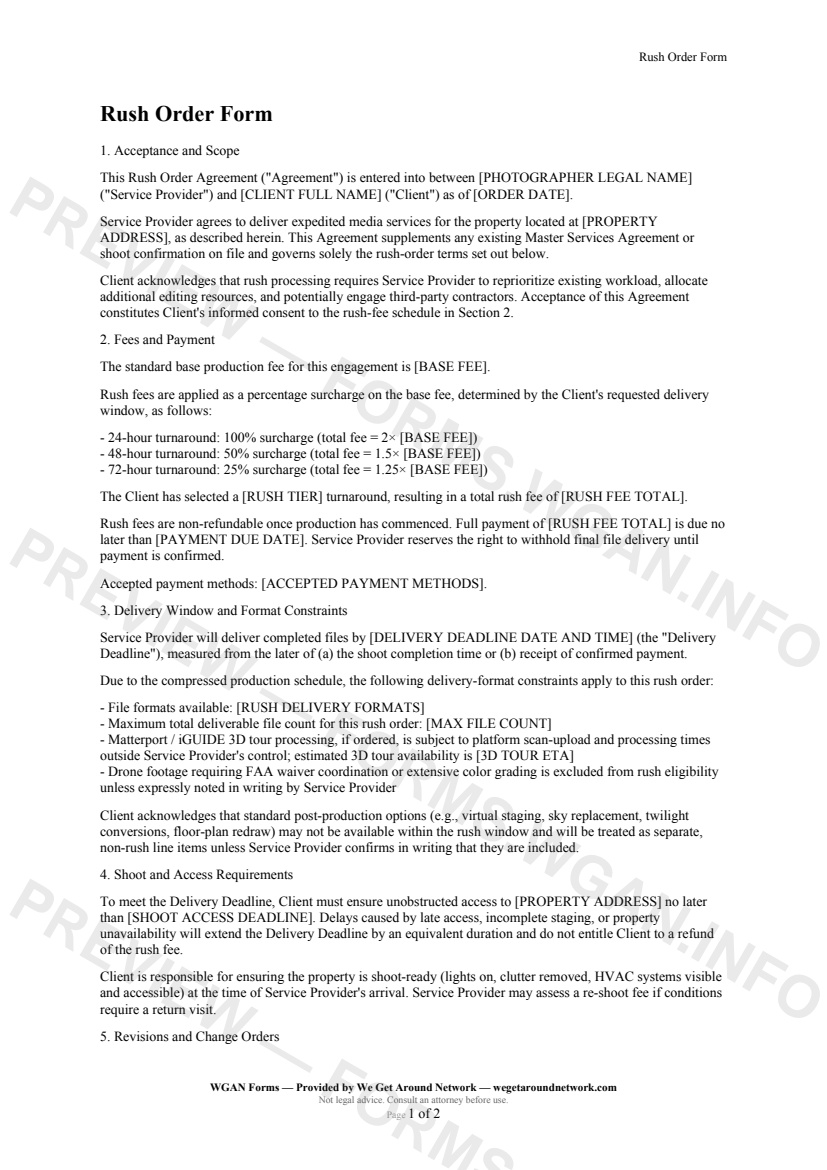
Rush Order Form — page 1 preview covering 1. Acceptance and Scope, 2. Fees and Payment, 3. Delivery Window and Format Constraints
Page 1
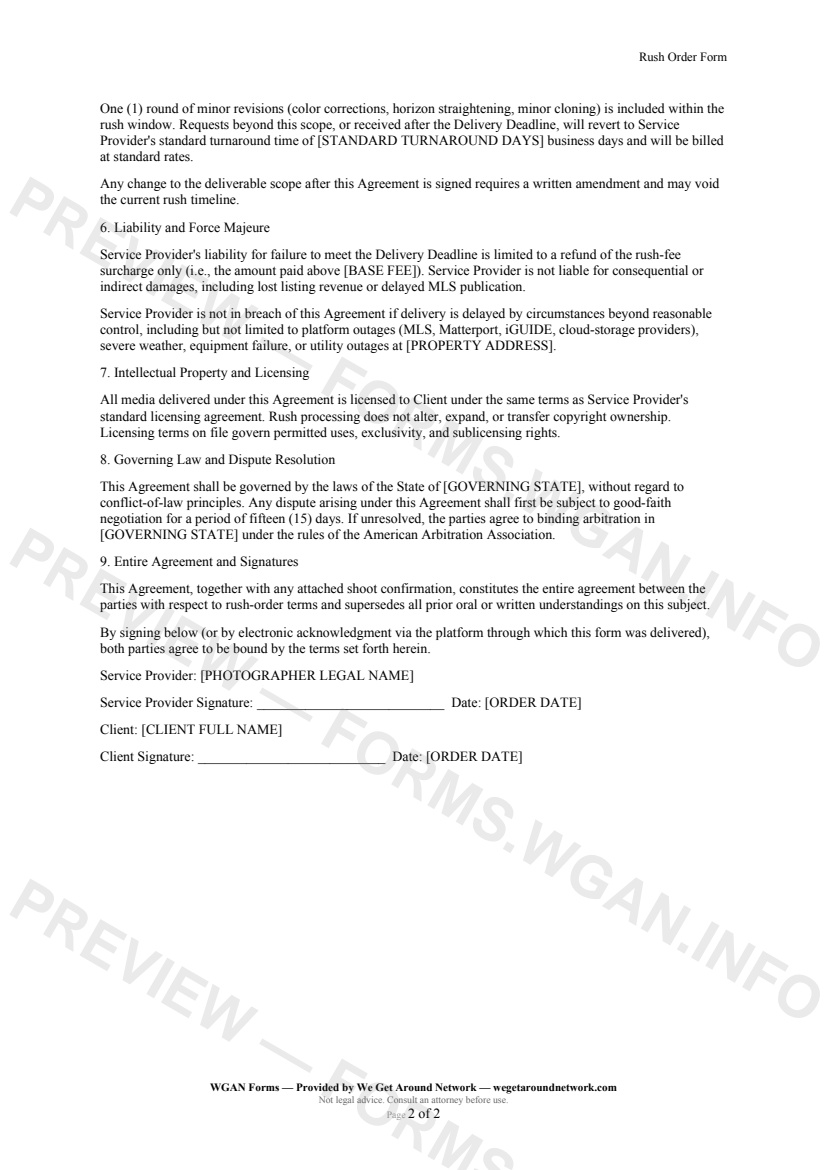
Rush Order Form — page 2 preview covering 6. Liability and Force Majeure, 7. Intellectual Property and Licensing, 8. Governing Law and Dispute Resolution
Page 2

First 2 pages shown — watermarked. Subscribe to fill out and download the unbranded document.

What this form covers

1. Acceptance and Scope

This Rush Order Agreement is entered into between your business and the client for the subject property. It supplements your existing shoot confirmation and governs exclusively the expedited-turnaround terms — keeping your standard agreement intact while layering on the rush-specific protections you need.

Client acknowledges upfront that rush processing requires you to reprioritize existing workload and potentially engage additional editing resources. Their signature confirms informed consent before production begins.

---

2. Fees and Payment

The form anchors every calculation to your **standard base fee**, then applies a crystal-clear surcharge schedule:

  • **24-hour turnaround → 100% surcharge** (you collect 2× the base fee) - **48-hour turnaround → 50% surcharge** (1.5× the base fee) - **72-hour turnaround → 25% surcharge** (1.25× the base fee)

The client selects their tier, the total rush fee is spelled out in dollars, and payment is due before files are released. Rush fees are **non-refundable** once production commences — no ambiguity, no awkward conversations.

---

3. Delivery Window and Format Constraints

A precise delivery deadline (date *and* time) is locked into the agreement. The template also documents:

  • Which **file formats** are available within the compressed window - The **maximum deliverable file count** for the rush order - A **Matterport / iGUIDE carve-out** acknowledging platform processing times outside your control - An **exclusion clause** for drone footage requiring FAA coordination or specialty edits (virtual staging, twilight conversions, sky replacement) — protecting you from scope creep on a tight deadline

---

4. Shoot and Access Requirements

If the client provides late access, the Delivery Deadline extends by an equivalent duration — and they forfeit the rush fee. Property must be shoot-ready on arrival; a re-shoot fee applies if a return visit is needed.

---

5. Liability Cap

Your maximum exposure for a missed deadline is limited to a refund of the **surcharge portion only** — not the full fee. Consequential damages, lost listing revenue, and delayed MLS publication are expressly excluded.

Table of contents

  1. 1. Acceptance and Scope
  2. 2. Fees and Payment
  3. 3. Delivery Window and Format Constraints
  4. 4. Shoot and Access Requirements
  5. 5. Revisions and Change Orders
  6. 6. Liability and Force Majeure
  7. 7. Intellectual Property and Licensing
  8. 8. Governing Law and Dispute Resolution
  9. 9. Entire Agreement and Signatures

What's included

  • Three-tier rush fee schedule: 24hr / 48hr / 72hr with 100% / 50% / 25% surcharges
  • Clear delivery deadline with date, time, and format constraints
  • Matterport and iGUIDE 3D tour platform-delay carve-out language
  • Drone and specialty-edit exclusion clauses for rush eligibility
  • Shoot-access and property-readiness requirements to protect your timeline
  • Revision scope limits within the rush window
  • Force majeure and platform-outage liability carve-out
  • Liability cap limiting exposure to the rush surcharge amount only
  • Governing-law and arbitration clause tailored to your state
  • Signature block for both service provider and client
#rush#expedited#order#workflow

Authoritative references

Official sources to consult when customizing this template. These supplement, but do not replace, advice from a qualified attorney licensed in your jurisdiction.

  • NIBS — National Institute of Building Sciences

    Standards and best practices for building documentation and digital twins.

Fill out this form

Subscribers only

Subscribe at $19/mo (or $149/yr) to fill any form online and download the completed PDF unlimited.

Sign in to subscribeSee pricing

Related forms in Job Intake & Workflow

Other templates capture pros use alongside this one.

See all in Job Intake & Workflow →
Job Intake & Workflow

Job Intake Sheet

Job Intake Sheet — WGAN 2026 form template.

View form
Job Intake & Workflow

QA / Delivery Checklist

A pre-delivery QA checklist for real estate photographers and 3D tour creators to verify every deliverable before sending to the client.

#qa#delivery#checklist
View form
Job Intake & Workflow

Twilight Blue Hour Request

A specialized shoot-request contract for real estate photographers covering twilight/blue-hour timing precision, extra fees, weather cancellation, and re-shoot policies.

#twilight#blue-hour#request
View form
Job Intake & Workflow

Property Access & Lockbox Details

A job-intake form listing agents complete to give real estate photographers secure, accurate property-access details before every shoot.

#property-access#lockbox#workflow
View form