We Get Around NetworkForms
Browse FormsPricingAbout
Sign inGet started
We Get Around Network

WGAN Forms

A library of business, legal, and operational templates built for real estate photographers, Matterport service providers, 3D capture specialists, and proptech professionals.

A product of We Get Around Network — the largest global community for real estate photographers and 3D capture pros.

Library

  • Browse forms
  • Pricing
  • Redeem promo code

Company

  • About
  • We Get Around Network
  • Legal disclaimer
  • Terms
  • Privacy

Disclaimer: All forms provided are templates for informational purposes only and do not constitute legal advice. Consult a qualified attorney before using any agreement in your business.

© 2026 We Get Around Network. All rights reserved.

Back to library
Internal Operations

Employee Contractor Onboarding Checklist

A step-by-step internal onboarding checklist for real estate photography businesses hiring second shooters, editors, or admin staff — covering paperwork, equipment, access, and first-shoot pairing.

Last updated Jul 7, 2026

Disclaimer: This template is for informational purposes only and is not legal advice. Have a qualified attorney review it before use.

What is the Employee Contractor Onboarding Checklist?

The Employee Contractor Onboarding Checklist is a structured internal onboarding document designed for real estate photography businesses bringing on second shooters, photo editors, or administrative staff. It guides the hiring business through eight sequential sections — from capturing role classification and collecting required paperwork, to issuing equipment, provisioning system access, reviewing policies, completing a supervised first-shoot pairing, and documenting compensation terms — producing a single signed record that confirms every onboarding step was completed.

When should you use this form?

The Employee Contractor Onboarding Checklist is appropriate any time a real estate photography or 3D tour business adds a new team member in any capacity — including independent contractor (1099) second shooters, W-2 part-time editors, Matterport or iGUIDE scan technicians, drone operators, or admin staff. It is especially useful when multiple hires occur in a short period and the business needs a repeatable, documented process to ensure no paperwork, equipment item, or system credential is overlooked before a new hire's first assignment.
What's included in this template?

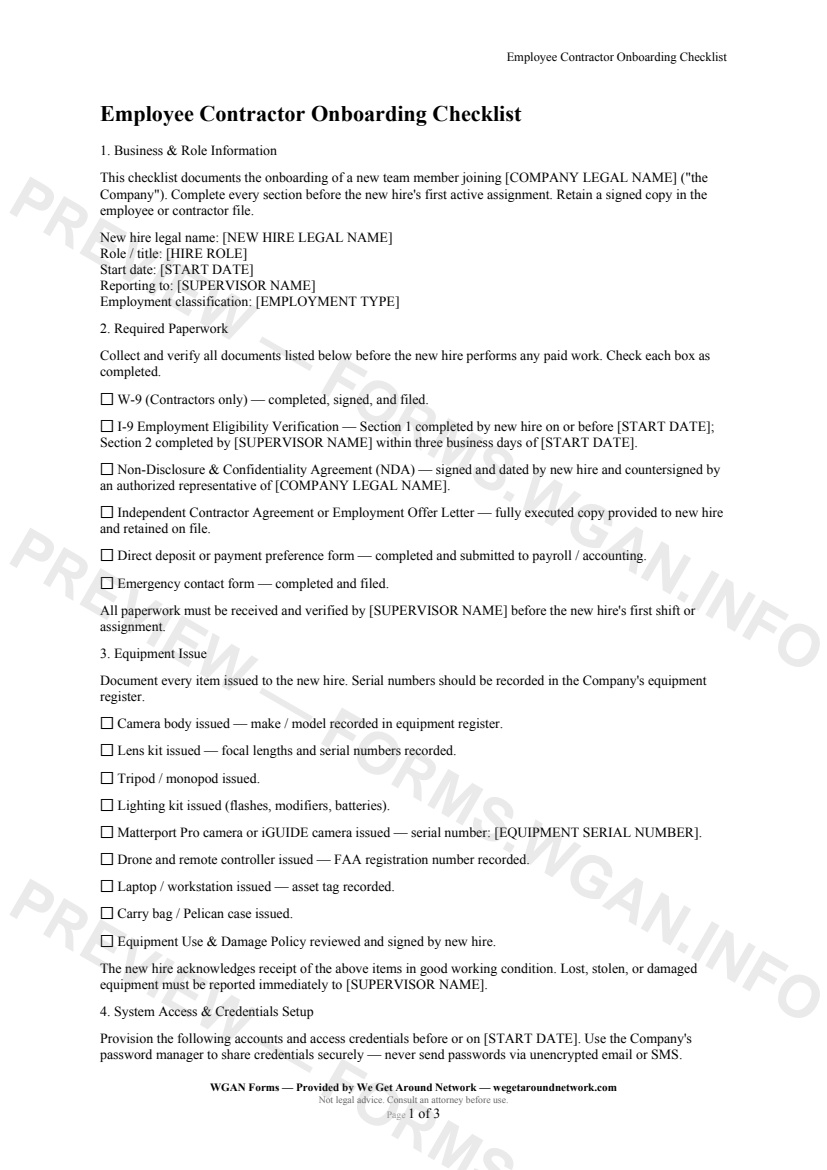
  • Business and role information fields: legal name, start date, employment classification (1099, W-2, part-time, seasonal)
  • Required paperwork tracker: W-9, I-9, NDA, contractor agreement or offer letter, direct deposit form, emergency contact
  • Equipment issue log: camera bodies, lens kits, lighting, Matterport Pro and iGUIDE scanners with serial numbers, drones, laptops
  • System access and credentials setup: company email, delivery portal, cloud storage, Matterport or iGUIDE workspace, 2FA confirmation
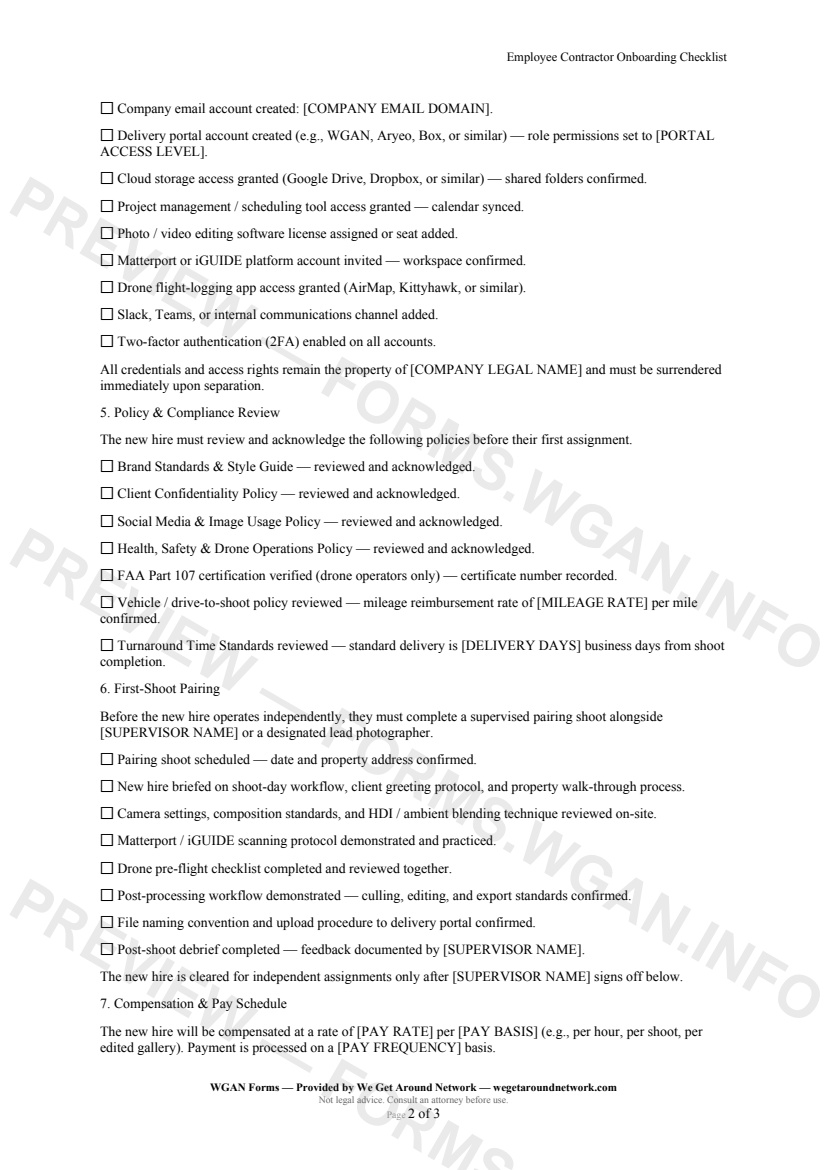
  • Policy and compliance review acknowledgment section
  • First-shoot pairing checklist: on-site walkthrough, 3D scanning protocol, drone pre-flight, post-processing demo, supervisor sign-off
  • Compensation and pay schedule fields: rate, pay basis, frequency, mileage reimbursement, invoice deadlines
  • Onboarding sign-off block with supervisor verification fields

How do I fill out this form?

  1. Open the form at forms.wgan.info. Navigate to forms.wgan.info and locate the Employee Contractor Onboarding Checklist in the business forms or HR templates section, then click to open the online form.
  2. Enter business and new-hire role details. Fill in the hiring business name, the new team member's legal name, start date, and employment classification — selecting Independent Contractor (1099), W-2, part-time, or seasonal as applicable.
  3. Complete each checklist section in order. Work through all eight sections sequentially: paperwork, equipment issue, system access, policy review, first-shoot pairing, and compensation fields, checking off or entering details as each item is addressed.
  4. Record equipment serial numbers and credential confirmations. Enter serial numbers for any issued gear — including Matterport Pro or iGUIDE scanners, drones, or laptops — and confirm system access items such as 2FA activation for each platform account.
  5. Capture supervisor and new-hire sign-off. Complete the onboarding sign-off section with the supervising team member's verification details and any required acknowledgment fields before finalizing the form.
  6. Download and save the completed checklist. Submit the completed form to generate a finalized PDF, then download and save it to the new hire's personnel file or your preferred cloud storage for recordkeeping.

Preview

Employee Contractor Onboarding Checklist — page 1 preview covering Business & Role Information, Required Paperwork, Equipment Issue
Page 1
Employee Contractor Onboarding Checklist — page 2 preview covering Policy & Compliance Review, First-Shoot Pairing, Compensation & Pay Schedule
Page 2

First 2 pages shown — watermarked. Subscribe to fill out and download the unbranded document.

What this form covers

Business & Role Information

Kick off every hire the right way. This checklist captures the new team member's legal name, role, start date, and employment classification — **Independent Contractor (1099), W-2, part-time, or seasonal** — so the right paperwork trail is opened from day one.

---

Required Paperwork

No one touches a camera or logs into a portal until the paperwork stack is complete. The checklist walks you through:

  • **W-9** (contractors) and **I-9** eligibility verification with proper timing requirements - A fully executed **NDA / Confidentiality Agreement** - Independent Contractor Agreement or Employment Offer Letter - Direct deposit / payment preference form - Emergency contact on file

Every item is tied to the supervisor responsible for verification, so nothing slips through the cracks.

---

Equipment Issue

Document every piece of gear that leaves your hands. The form tracks camera bodies, lens kits, lighting, **Matterport Pro / iGUIDE scanners** (with serial numbers), drones, laptops, and carry cases — plus acknowledgment of the Equipment Use & Damage Policy.

---

System Access & Credentials Setup

Provision accounts methodically before the start date:

  • Company email and delivery portal (role-based permissions) - Cloud storage shared folders, project management, and scheduling tools - **Matterport or iGUIDE platform** workspace invite - Drone flight-logging app, editing software seat, and internal communications - 2FA enabled on every account — mandatory

---

First-Shoot Pairing

Before going solo, every new hire completes a **supervised pairing shoot**. The checklist covers the on-site walkthrough, camera settings review, 3D scanning protocol, drone pre-flight, post-processing demo, and a formal post-shoot debrief — with supervisor sign-off required to unlock independent assignments.

---

Compensation & Pay Schedule

Set clear expectations from the start: pay rate, pay basis (per hour, per shoot, per gallery), pay frequency, mileage reimbursement rate, and invoice / timesheet submission deadlines — all documented in one place.

Table of contents

  1. Business & Role Information
  2. Required Paperwork
  3. Equipment Issue
  4. System Access & Credentials Setup
  5. Policy & Compliance Review
  6. First-Shoot Pairing
  7. Compensation & Pay Schedule
  8. Onboarding Sign-Off

What's included

  • W-9, I-9, NDA, and offer letter paperwork checklist
  • Equipment issue log with serial number tracking
  • Delivery portal and cloud storage access provisioning
  • Password and two-factor authentication setup steps
  • FAA Part 107 and drone compliance verification
  • Matterport and iGUIDE platform account setup
  • Supervised first-shoot pairing and sign-off workflow
  • Pay rate, mileage reimbursement, and pay schedule terms
  • Policy acknowledgment: brand, confidentiality, social media, safety
  • Dual-signature onboarding sign-off for personnel file
#onboarding#employee#checklist#internal

Fill out this form

Subscribers only

Subscribe at $19/mo (or $149/yr) to fill any form online and download the completed PDF unlimited.

Sign in to subscribeSee pricing

Related forms in Internal Operations

Other templates capture pros use alongside this one.

See all in Internal Operations →
Internal Operations

Internal Incident Damage Report

A structured internal incident and damage report for real estate photographers, drone operators, and 3D tour providers to document equipment damage, property damage, or safety incidents during a shoot.

#incident#damage#report
View form
Internal Operations

Mileage Log

IRS-compliant personal-vehicle mileage log for real estate photographers and proptech professionals to track business-travel deductions year-round.

#mileage#log#tax
View form
Internal Operations

Equipment Inventory Sheet

An internal equipment inventory sheet for real estate photographers and proptech pros to document gear details, serial numbers, purchase dates, and current values for insurance and tax tracking.

#equipment#inventory#internal
View form
Internal Operations

W-9 Collection Form

An internal cover sheet and tracking checklist real estate photographers use to collect, log, and file W-9 tax forms from subcontractors, second shooters, and vendors for accurate 1099 reporting.

#w9#tax#internal
View form