We Get Around NetworkForms
Browse FormsPricingAbout
Sign inGet started
We Get Around Network

WGAN Forms

A library of business, legal, and operational templates built for real estate photographers, Matterport service providers, 3D capture specialists, and proptech professionals.

A product of We Get Around Network — the largest global community for real estate photographers and 3D capture pros.

Library

  • Browse forms
  • Pricing
  • Redeem promo code

Company

  • About
  • We Get Around Network
  • Legal disclaimer
  • Terms
  • Privacy

Disclaimer: All forms provided are templates for informational purposes only and do not constitute legal advice. Consult a qualified attorney before using any agreement in your business.

© 2026 We Get Around Network. All rights reserved.

Back to library
Internal Operations

Equipment Inventory Sheet

An internal equipment inventory sheet for real estate photographers and proptech pros to document gear details, serial numbers, purchase dates, and current values for insurance and tax tracking.

Last updated Jul 7, 2026

Disclaimer: This template is for informational purposes only and is not legal advice. Have a qualified attorney review it before use.

What is the Equipment Inventory Sheet?

The Equipment Inventory Sheet is an internal tracking document designed for real estate photographers, 3D tour creators, and reality-capture professionals to catalog business-owned gear in one structured record. It captures make, model, serial number, purchase date, original price, and current estimated value for every equipment category — from camera bodies and lenses to drones, LiDAR scanners, and licensed software — supporting insurance claims, annual policy renewals, and Schedule C tax depreciation reviews.

When should you use this form?

The Equipment Inventory Sheet is most useful when renewing a business equipment insurance policy, filing a claim after theft or damage, preparing for year-end tax documentation, or onboarding a new accountant who needs a full asset list. It is also appropriate when a photographer adds high-value gear — such as a Matterport Pro3, a drone, or a RAID storage array — and needs to update an insurer's scheduled property endorsement.
What's included in this template?

  • Business information header with legal name, DBA, address, and inventory date
  • Camera body entries with serial number, purchase date, original price, and current estimated value
  • Lens and optical accessory entries with condition dropdown and insured-status flag
  • Drone and aerial equipment section with combined serial/FAA registration number field
  • 3D scanning camera entries supporting Matterport, iGUIDE, NavVis, and LiDAR devices
  • Lighting, tripod, and support equipment line items
  • Memory cards, NVMe drives, RAID arrays, laptops, tablets, and licensed software assets
  • Aggregate summary with total item count, combined purchase value, combined current value, and insurance policy reference fields

How do I fill out this form?

  1. Open the form at forms.wgan.info. Navigate to forms.wgan.info and locate the Equipment Inventory Sheet template. Click the form to open the online entry interface in your browser — no software installation required.
  2. Enter business information fields. Fill in the legal business name, DBA if applicable, business address, and inventory date. This date will serve as the valuation reference point for all equipment entries throughout the sheet.
  3. Add equipment entries by category. Work through each section — camera bodies, lenses, drones, 3D scanners, lighting, storage, and computing — entering the make, model, serial number, purchase date, original price, and current estimated value for every item.
  4. Set condition and insurance status flags. Use the condition dropdown (Excellent through Damaged/Non-functional) and the insured-status flag (Yes, No, or Pending) on each entry to indicate the item's physical state and coverage status.
  5. Review the aggregate summary section. Confirm the auto-calculated total item count and combined values in the Aggregate Inventory Summary. Enter your insurance provider name, policy number, and annual premium in the reference fields.
  6. Download and save the completed sheet. Once all entries are verified, use the download option to save the completed Equipment Inventory Sheet as a PDF or spreadsheet file for your insurance provider, accountant, or business records.

Preview

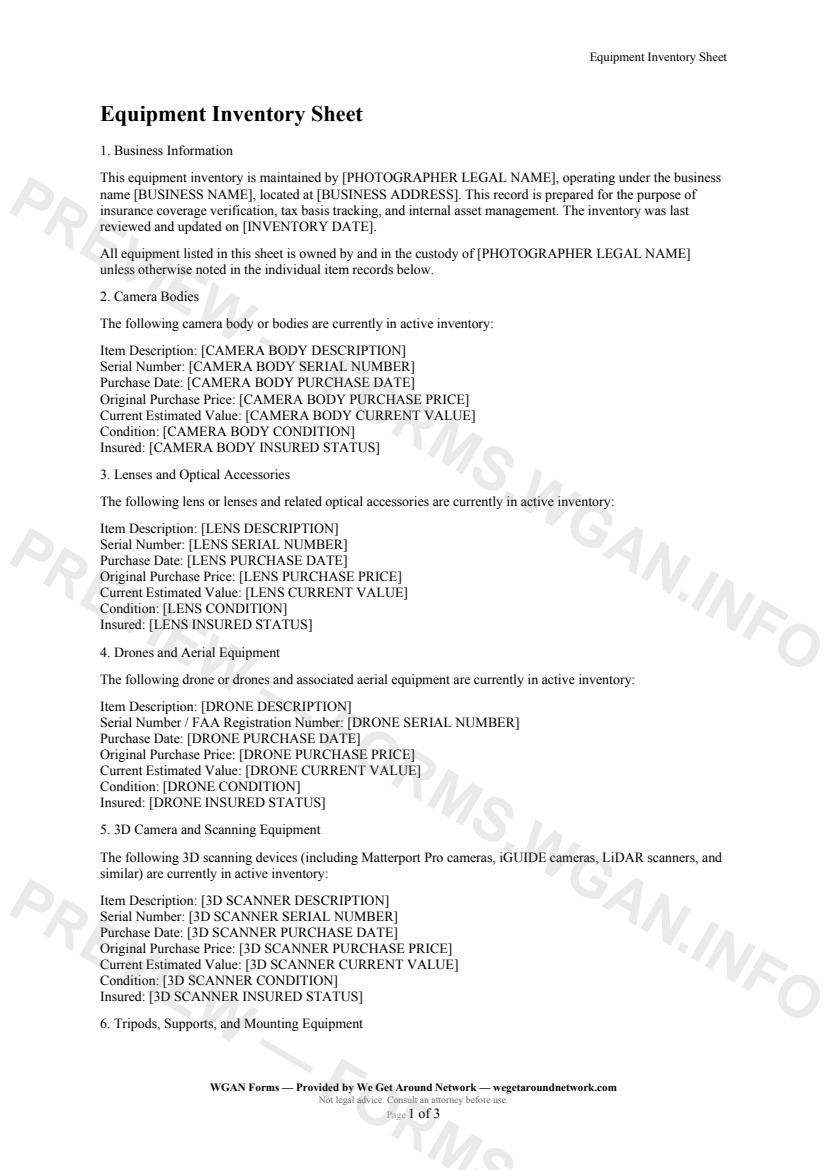
Equipment Inventory Sheet — page 1 preview covering Business Information, Camera Bodies, Lenses and Optical Accessories
Page 1
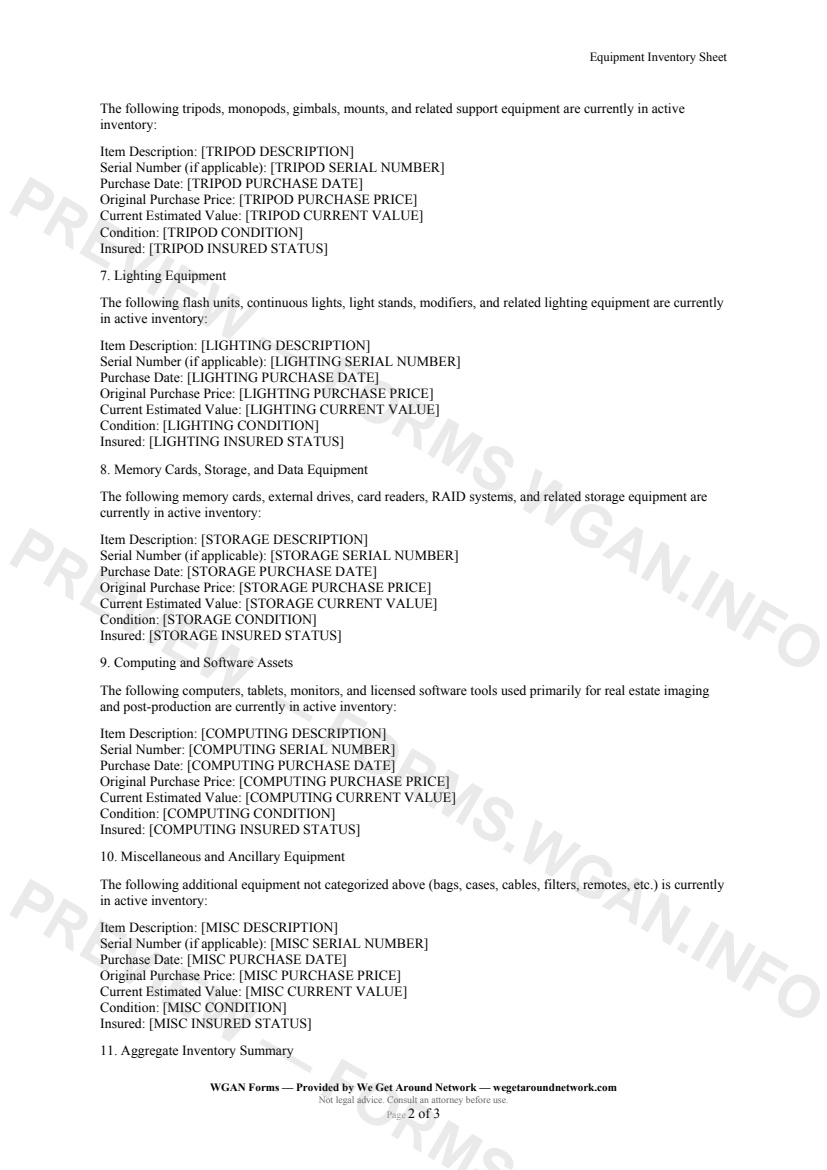
Equipment Inventory Sheet — page 2 preview covering Lighting Equipment, Memory Cards, Storage, and Data Equipment, Computing and Software Assets
Page 2

First 2 pages shown — watermarked. Subscribe to fill out and download the unbranded document.

What this form covers

Business Information

The form opens by anchoring every record to a verified business identity — legal name, DBA, and business address — so the sheet holds up under scrutiny from an insurance adjuster or tax accountant. A single **Inventory Date** field propagates throughout the document, making it clear exactly when values were assessed.

Camera Bodies and Lenses

Each camera body entry captures the **make and model description**, a **serial number**, the **original purchase date and price**, and a **current estimated value** — the four data points your insurer needs to settle a claim quickly. Lens entries follow the same structure, with a condition dropdown (Excellent → Damaged / Non-functional) and a simple Yes / No / Pending insured-status flag.

Drones and Aerial Equipment

The drone section adds a combined **serial number / FAA registration number** field, recognizing that many Part 107 operators carry separate hull insurance for their aerial rigs. Record purchase price alongside today's replacement cost to surface depreciation at a glance.

3D Scanning Cameras

Matterport Pro3, iGUIDE, NavVis, and LiDAR scanners each get their own entry block — critical for providers whose scanning hardware can represent $5,000–$20,000 or more in a single line item.

Storage Media and Computing

  • Memory cards, CFexpress cards, NVMe drives, and RAID arrays - Laptops, monitors, and tablets with serial numbers - Licensed software assets (Lightroom, Capture One, PTGui, etc.)

Aggregate Summary and Insurance Reference

The final section rolls up a **total item count**, **combined original purchase value**, and **combined current estimated value**, then links directly to your **insurance provider name**, **policy number**, and **annual premium** — everything you need for a renewal conversation or a Schedule C depreciation review, in one place.

Table of contents

  1. Business Information
  2. Camera Bodies
  3. Lenses and Optical Accessories
  4. Drones and Aerial Equipment
  5. 3D Camera and Scanning Equipment
  6. Tripods, Supports, and Mounting Equipment
  7. Lighting Equipment
  8. Memory Cards, Storage, and Data Equipment
  9. Computing and Software Assets
  10. Miscellaneous and Ancillary Equipment
  11. Aggregate Inventory Summary
  12. Verification and Review Notes

What's included

  • Business and owner identification fields
  • Camera body serial numbers, purchase dates, and current values
  • Lens and optical accessory tracking by serial number
  • Drone and FAA registration number documentation
  • Matterport, iGUIDE, and LiDAR scanner records
  • Tripod, gimbal, and support equipment entries
  • Lighting gear with condition and insurance status
  • Memory cards and storage device inventory
  • Computing hardware and licensed software assets
  • Aggregate totals and insurance policy cross-reference
#equipment#inventory#internal#insurance

Fill out this form

Subscribers only

Subscribe at $19/mo (or $149/yr) to fill any form online and download the completed PDF unlimited.

Sign in to subscribeSee pricing

Related forms in Internal Operations

Other templates capture pros use alongside this one.

See all in Internal Operations →
Internal Operations

W-9 Collection Form

An internal cover sheet and tracking checklist real estate photographers use to collect, log, and file W-9 tax forms from subcontractors, second shooters, and vendors for accurate 1099 reporting.

#w9#tax#internal
View form
Internal Operations

Internal Incident Damage Report

A structured internal incident and damage report for real estate photographers, drone operators, and 3D tour providers to document equipment damage, property damage, or safety incidents during a shoot.

#incident#damage#report
View form
Internal Operations

Mileage Log

IRS-compliant personal-vehicle mileage log for real estate photographers and proptech professionals to track business-travel deductions year-round.

#mileage#log#tax
View form
Internal Operations

Employee Contractor Onboarding Checklist

A step-by-step internal onboarding checklist for real estate photography businesses hiring second shooters, editors, or admin staff — covering paperwork, equipment, access, and first-shoot pairing.

#onboarding#employee#checklist
View form