We Get Around NetworkForms
Browse FormsPricingAbout
Sign inGet started
We Get Around Network

WGAN Forms

A library of business, legal, and operational templates built for real estate photographers, Matterport service providers, 3D capture specialists, and proptech professionals.

A product of We Get Around Network — the largest global community for real estate photographers and 3D capture pros.

Library

  • Browse forms
  • Pricing
  • Redeem promo code

Company

  • About
  • We Get Around Network
  • Legal disclaimer
  • Terms
  • Privacy

Disclaimer: All forms provided are templates for informational purposes only and do not constitute legal advice. Consult a qualified attorney before using any agreement in your business.

© 2026 We Get Around Network. All rights reserved.

Back to library
Internal Operations

W-9 Collection Form

An internal cover sheet and tracking checklist real estate photographers use to collect, log, and file W-9 tax forms from subcontractors, second shooters, and vendors for accurate 1099 reporting.

Last updated Jul 7, 2026

Disclaimer: This template is for informational purposes only and is not legal advice. Have a qualified attorney review it before use.

What is the W-9 Collection Form?

The W-9 Collection Form is an internal administrative cover sheet and tracking checklist used by real estate photographers, drone pilots, and reality-capture professionals to collect, log, and file IRS Form W-9 documents from subcontractors, second shooters, and vendors. It records payee details, payment totals, request and receipt dates, TIN types, storage locations, and 1099 issuance status — creating an auditable paper trail for accurate 1099-NEC and 1099-MISC reporting without transmitting anything directly to the IRS.

When should you use this form?

Use the W-9 Collection Form at the start of any tax year in which payments to a subcontractor, second shooter, drone pilot, Matterport editor, iGUIDE processor, or other vendor may cross the $600 IRS reporting threshold. It is also appropriate mid-year when onboarding a new vendor for the first time, when a TIN mismatch triggers a backup-withholding review, or during year-end close when reconciling 1099 obligations before the January filing deadline.

What's included in this template?

  • Business information block identifying the maintaining entity and tax year covered
  • Subcontractor and vendor detail fields: legal name, trade name, address, email, phone, and service description
  • Payment total field with a built-in $600 reporting-threshold reference
  • W-9 request tracking log: first request date, follow-up reminder date, and receipt date
  • Delivery method selector: email, secure upload, in person, fax, or mail
  • TIN type designation field: SSN, EIN, or ITIN with name-match confirmation
  • Filing and storage log with 1099 issuance status, IRS transmission date, and seven-year retention reminder
  • Preparer certification block with signature and date confirming W-9 is on file

How do I fill out this form?

  1. Open the form at forms.wgan.info. Navigate to forms.wgan.info and locate the W-9 Collection Form in the Tax & Accounting or Subcontractor section of the WGAN Forms Library.
  2. Enter your business information. Type your legal business name, contact details, and the tax year this log covers into the Business Information section of the online form.
  3. Fill in subcontractor or vendor details. Enter the payee's legal name, trade name, mailing address, email, phone number, service description, and total payments made during the tax year.
  4. Complete the W-9 request tracking fields. Record the dates you requested and received the W-9, select the delivery method used, confirm the name match, and choose the correct TIN type: SSN, EIN, or ITIN.
  5. Log filing, storage, and 1099 status. Specify where the original W-9 is stored, then record the 1099 issuance status, IRS transmission date, vendor copy delivery date, and applicable state retention period.
  6. Certify, download, and save the completed form. Complete the preparer certification block with a name and date, then download the finished PDF to store alongside the physical or digital W-9 on file.

Preview

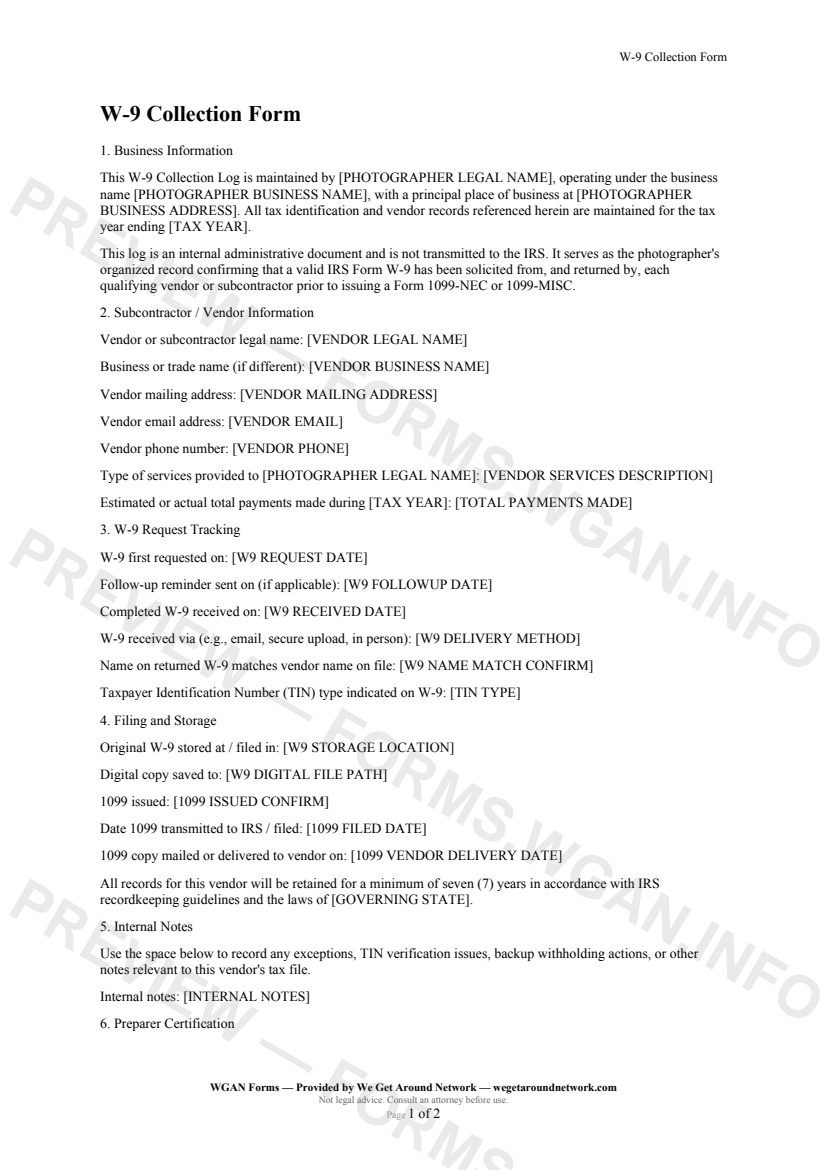
W-9 Collection Form — page 1 preview covering 1. Business Information, 2. Subcontractor / Vendor Information, 3. W-9 Request Tracking
Page 1
W-9 Collection Form — page 2 preview covering 4. Filing and Storage, 5. Internal Notes, 6. Preparer Certification
Page 2

First 2 pages shown — watermarked. Subscribe to fill out and download the unbranded document.

What this form covers

1. Business Information

This W-9 Collection Log is maintained by your business and covers all qualifying vendors and subcontractors paid during a specified tax year. The cover sheet is an **internal administrative document** — it is never transmitted to the IRS. Its purpose is to give you a clean, auditable record confirming that a valid IRS Form W-9 was solicited and received before you issue any Form 1099-NEC or 1099-MISC.

2. Subcontractor / Vendor Information

Capture every key detail about the payee in one place: legal name, trade name, mailing address, email, phone, and a plain-language description of the services they provided — whether that's second shooting a listing, piloting a drone, editing a Matterport walkthrough, or processing an iGUIDE floor plan. You'll also log the **total payments made** during the tax year so you can quickly confirm whether the $600 reporting threshold has been crossed.

3. W-9 Request Tracking

  • Date the W-9 was first requested - Date a follow-up reminder was sent (if needed) - Date the completed W-9 was received - Delivery method: email, secure upload, in person, fax, or mail - Confirmation that the name on the returned W-9 matches your records - TIN type: SSN, EIN, or ITIN

4. Filing and Storage

Log exactly where the original W-9 lives — a locked filing cabinet, a secure cloud folder, or both. Then record the 1099 issuance status, the IRS transmission date, and the date the vendor copy was delivered. A built-in retention reminder flags the **seven-year IRS recordkeeping standard** tied to your governing state.

5. Internal Notes & Preparer Certification

A free-text notes field handles TIN mismatches, backup withholding actions, or any other exception. The form closes with a preparer certification block so you have a dated, signed confirmation that the underlying W-9 is on file and 1099 obligations have been reviewed.

Table of contents

  1. 1. Business Information
  2. 2. Subcontractor / Vendor Information
  3. 3. W-9 Request Tracking
  4. 4. Filing and Storage
  5. 5. Internal Notes
  6. 6. Preparer Certification

What's included

  • Photographer and business identification section
  • Vendor legal name, address, and contact fields
  • W-9 request date, follow-up, and receipt tracking
  • Delivery method and TIN type confirmation fields
  • Physical and digital W-9 storage location logging
  • 1099 issuance status and filing date tracking
  • Seven-year retention reminder tied to governing state
  • Internal notes field for TIN issues and exceptions
  • Preparer certification sign-off with completion date
#w9#tax#internal#contractor#1099

Fill out this form

Subscribers only

Subscribe at $19/mo (or $149/yr) to fill any form online and download the completed PDF unlimited.

Sign in to subscribeSee pricing

Related forms in Internal Operations

Other templates capture pros use alongside this one.

See all in Internal Operations →
Internal Operations

Internal Incident Damage Report

A structured internal incident and damage report for real estate photographers, drone operators, and 3D tour providers to document equipment damage, property damage, or safety incidents during a shoot.

#incident#damage#report
View form
Internal Operations

Mileage Log

IRS-compliant personal-vehicle mileage log for real estate photographers and proptech professionals to track business-travel deductions year-round.

#mileage#log#tax
View form
Internal Operations

Equipment Inventory Sheet

An internal equipment inventory sheet for real estate photographers and proptech pros to document gear details, serial numbers, purchase dates, and current values for insurance and tax tracking.

#equipment#inventory#internal
View form
Internal Operations

Employee Contractor Onboarding Checklist

A step-by-step internal onboarding checklist for real estate photography businesses hiring second shooters, editors, or admin staff — covering paperwork, equipment, access, and first-shoot pairing.

#onboarding#employee#checklist
View form