We Get Around NetworkForms
Browse FormsPricingAbout
Sign inGet started
We Get Around Network

WGAN Forms

A library of business, legal, and operational templates built for real estate photographers, Matterport service providers, 3D capture specialists, and proptech professionals.

A product of We Get Around Network — the largest global community for real estate photographers and 3D capture pros.

Library

  • Browse forms
  • Pricing
  • Redeem promo code

Company

  • About
  • We Get Around Network
  • Legal disclaimer
  • Terms
  • Privacy

Disclaimer: All forms provided are templates for informational purposes only and do not constitute legal advice. Consult a qualified attorney before using any agreement in your business.

© 2026 We Get Around Network. All rights reserved.

Back to library
Internal Operations

Internal Incident Damage Report

A structured internal incident and damage report for real estate photographers, drone operators, and 3D tour providers to document equipment damage, property damage, or safety incidents during a shoot.

Last updated Jul 7, 2026

Disclaimer: This template is for informational purposes only and is not legal advice. Have a qualified attorney review it before use.

What is the Internal Incident Damage Report?

The Internal Incident Damage Report is a structured form for real estate photographers, drone operators, and 3D tour providers to document equipment damage, property damage, or safety incidents that occur during a shoot. It captures report identification, incident classification, personnel details, a chronological incident description, damage inventories with cost estimates, root-cause contributing factors, corrective actions, and insurance claim tracking — creating a complete, signed internal record from a single standardized document.

When should you use this form?

The Internal Incident Damage Report is appropriate any time an incident occurs on a shoot site: a camera or drone is dropped and damaged, a tripod scratches a client's hardwood floor, a UAV experiences a flyaway or forced landing, a crew member or bystander is injured, or a near-miss occurs that could have caused harm. It is also used after the fact when a client contacts the photographer to report damage discovered after the crew departed.
What's included in this template?

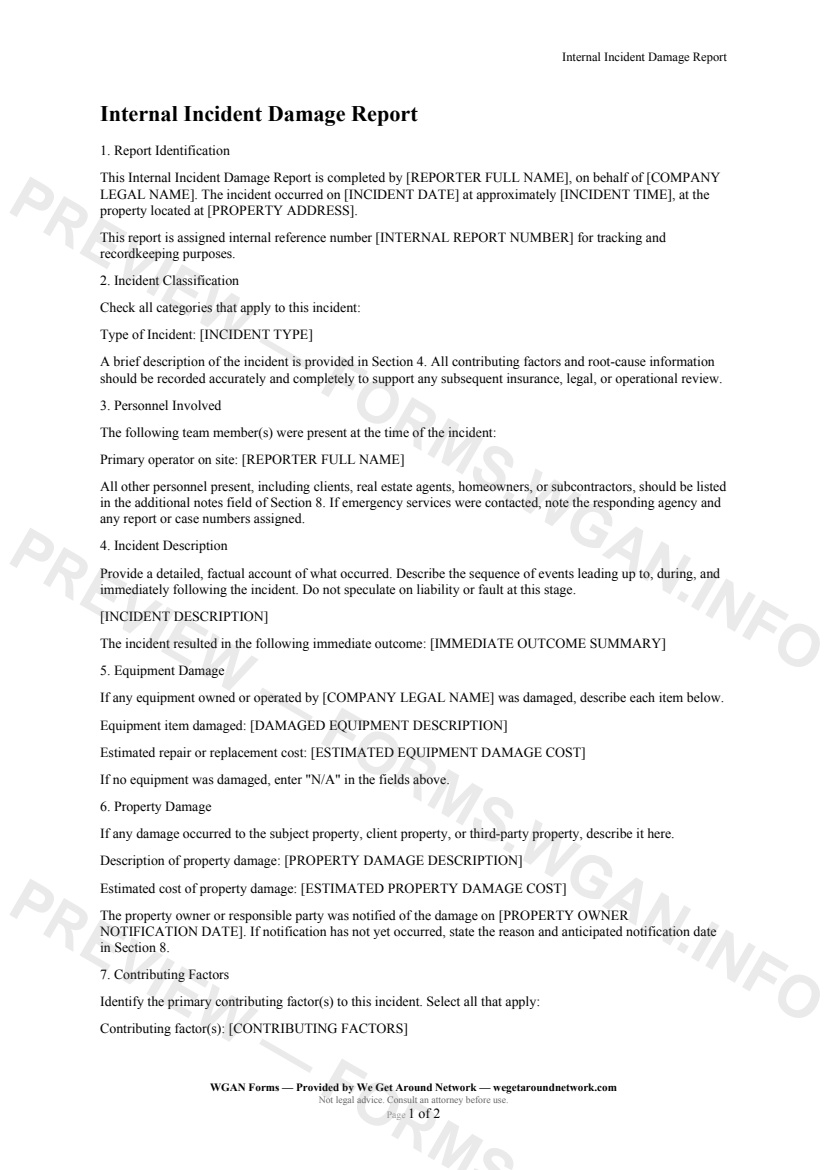
  • Report identification: reporter name, company, date, time, and property address
  • Internal reference number field for filing system integration
  • Eight pre-defined incident-type classifications including drone/UAV incident and near miss
  • Chronological incident description and immediate outcome summary
  • Equipment damage log with make, model, serial number, and repair or replacement cost estimate
  • Property damage record with location, nature, extent, and client notification date
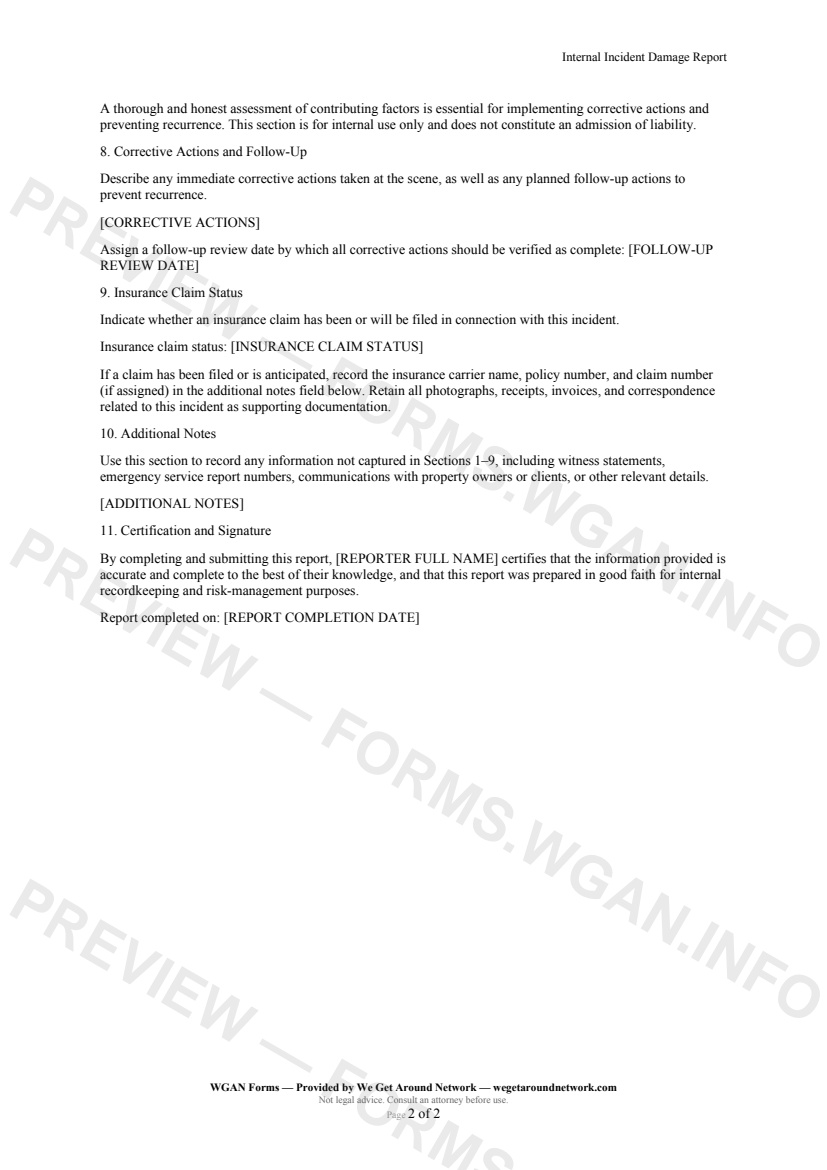
  • Contributing factors section for root-cause analysis without assigning legal fault
  • Corrective actions, follow-up review date, and insurance claim status tracking
  • Certification and signature block attesting to accuracy of all reported information

How do I fill out this form?

  1. Open the form at forms.wgan.info. Navigate to the Internal Incident Damage Report page in the WGAN Forms Library at forms.wgan.info and click the button to open the online form.
  2. Complete the Report Identification section. Enter the reporter's name, company, internal reference number, incident date and approximate time, and the full property address where the incident occurred.
  3. Classify the incident and describe events. Select the applicable incident type from the eight pre-defined categories, then write a factual, chronological description of what happened and summarize the immediate outcome.
  4. Document equipment and property damage. List each damaged item by make, model, and serial number with a repair or replacement cost estimate. Record any property damage by location, nature, extent, and the date the client or owner was notified.
  5. Record contributing factors and corrective actions. Identify root-cause contributing factors such as environmental conditions or equipment malfunction, then log immediate remediation steps, longer-term prevention measures, and an assigned follow-up review date.
  6. Sign, download, and file the completed report. Complete the certification statement, add the reporter's signature, then download the finished PDF to store in the project file and share with an insurance adjuster or company records system as needed.

Preview

Internal Incident Damage Report — page 1 preview covering Report Identification, Incident Classification, Personnel Involved
Page 1
Internal Incident Damage Report — page 2 preview covering Contributing Factors, Corrective Actions and Follow-Up, Insurance Claim Status
Page 2

First 2 pages shown — watermarked. Subscribe to fill out and download the unbranded document.

What this form covers

Report Identification

Every incident starts with a clear paper trail. This form opens by capturing the reporter's name, company, the exact date and approximate time of the event, and the full property address where it occurred — so there is never any ambiguity about when, where, or who filed the report. An internal reference number ties the record to your filing system from day one.

Incident Classification & Description

Select from eight pre-defined incident types — equipment damage, property damage, drone/UAV incident, personal injury, near miss, and more — so your records are sortable and searchable over time. The freeform description section then walks the reporter through the sequence of events in factual, chronological order, followed by a concise immediate outcome summary.

Equipment & Property Damage

  • Document every damaged item with make, model, and serial number - Record estimated repair or replacement costs for equipment - Describe property damage by location, nature, and extent - Log the date the property owner or client was notified

Keeping repair cost estimates alongside damage descriptions gives your bookkeeper and insurance adjuster everything they need in one place.

Contributing Factors & Corrective Actions

Honest root-cause analysis is the engine of risk reduction. This section prompts the reporter to identify contributing factors — wet floors, equipment malfunction, operator error, environmental conditions — without assigning legal fault. A dedicated corrective actions field then captures both immediate remediation steps and longer-term prevention measures, anchored by an assigned follow-up review date.

Insurance Claim Status

Track whether a claim has been filed, is in progress, or is not applicable, and store carrier, policy, and claim numbers in the additional notes field for fast retrieval when an adjuster calls.

The form closes with a certification statement confirming the reporter attests to the accuracy of all information provided.

Table of contents

  1. Report Identification
  2. Incident Classification
  3. Personnel Involved
  4. Incident Description
  5. Equipment Damage
  6. Property Damage
  7. Contributing Factors
  8. Corrective Actions and Follow-Up
  9. Insurance Claim Status
  10. Additional Notes
  11. Certification and Signature

What's included

  • Unique internal reference number and incident identification fields
  • Incident type classification covering equipment, property, drone, and safety events
  • Structured narrative fields for factual incident description and immediate outcome
  • Equipment damage inventory with estimated repair or replacement cost
  • Property damage documentation with owner notification tracking
  • Root-cause and contributing factor analysis section
  • Corrective action plan with assigned follow-up review date
  • Insurance claim status tracking with space for carrier and claim details
  • Certification statement for reporter accountability and recordkeeping
  • Open additional notes field for witnesses, emergency reports, and communications
#incident#damage#report#internal

Fill out this form

Subscribers only

Subscribe at $19/mo (or $149/yr) to fill any form online and download the completed PDF unlimited.

Sign in to subscribeSee pricing

Related forms in Internal Operations

Other templates capture pros use alongside this one.

See all in Internal Operations →
Internal Operations

W-9 Collection Form

An internal cover sheet and tracking checklist real estate photographers use to collect, log, and file W-9 tax forms from subcontractors, second shooters, and vendors for accurate 1099 reporting.

#w9#tax#internal
View form
Internal Operations

Mileage Log

IRS-compliant personal-vehicle mileage log for real estate photographers and proptech professionals to track business-travel deductions year-round.

#mileage#log#tax
View form
Internal Operations

Equipment Inventory Sheet

An internal equipment inventory sheet for real estate photographers and proptech pros to document gear details, serial numbers, purchase dates, and current values for insurance and tax tracking.

#equipment#inventory#internal
View form
Internal Operations

Employee Contractor Onboarding Checklist

A step-by-step internal onboarding checklist for real estate photography businesses hiring second shooters, editors, or admin staff — covering paperwork, equipment, access, and first-shoot pairing.

#onboarding#employee#checklist
View form