We Get Around NetworkForms
Browse FormsPricingAbout
Sign inGet started
We Get Around Network

WGAN Forms

A library of business, legal, and operational templates built for real estate photographers, Matterport service providers, 3D capture specialists, and proptech professionals.

A product of We Get Around Network — the largest global community for real estate photographers and 3D capture pros.

Library

  • Browse forms
  • Pricing
  • Redeem promo code

Company

  • About
  • We Get Around Network
  • Legal disclaimer
  • Terms
  • Privacy

Disclaimer: All forms provided are templates for informational purposes only and do not constitute legal advice. Consult a qualified attorney before using any agreement in your business.

© 2026 We Get Around Network. All rights reserved.

Back to library
Internal Operations

Expense Report

A structured expense report template for real estate photographers and proptech professionals to track, categorize, and flag client-billable vs. non-billable business expenses.

Last updated Jul 7, 2026

Disclaimer: This template is for informational purposes only and is not legal advice. Have a qualified attorney review it before use.

What is the Expense Report?

The Expense Report is a structured template designed for real estate photographers, 3D tour creators, and proptech professionals to document, categorize, and reconcile business expenses. It captures submitter details, up to five itemized expense lines, a billable vs. non-billable summary, and receipt status. A built-in category guide covers drone operations, mileage, software subscriptions, and equipment. An approver section supports both solo operators and multi-person teams.

When should you use this form?

The Expense Report is the right tool whenever a real estate media professional needs to submit reimbursable costs to a broker, property management firm, or agency client, reconcile monthly business spending for bookkeeping, or document pass-through charges — such as Matterport cloud fees, FAA drone authorizations, or shoot-day parking — on a client invoice. It also serves solo photographers preparing records for quarterly tax filings.
What's included in this template?

  • Submitter information: legal name, DBA, email, phone, and reporting period dates
  • Up to five itemized expense lines with vendor, date, category, and USD amount
  • Billable vs. non-billable flag and client/project name for each expense line
  • Receipt status indicator: attached, available on request, or unavailable
  • 10-category reference guide covering drone operations, mileage, software subscriptions, and more
  • Expense summary tallying total billable, total non-billable, and grand total
  • Certification and signature block for the submitter
  • Approver-only section with approval status, reimbursement amount, and reviewer notes

How do I fill out this form?

  1. Open the form at forms.wgan.info. Navigate to the Expense Report template in the WGAN Forms Library at forms.wgan.info and click the form to open the online fill-in interface.
  2. Enter submitter and report period details. Type your legal name, business or DBA name, email, phone number, and the start and end dates of the reporting period into the Submitter Information section.
  3. Add individual expense line entries. Complete each expense line by selecting a date, vendor name, category from the dropdown, business-purpose description, USD amount, billable flag, client/project name, and receipt status.
  4. Review the auto-tallied expense summary. Confirm the Expense Summary section correctly reflects your total billable, total non-billable, and grand total amounts before proceeding to the signature block.
  5. Sign and certify the report. Enter your name in the Certification and Signature block to attest that all entries are accurate, complete, and submitted for the correct reporting period.
  6. Download and submit the completed report. Click the download button to save the finished report as a PDF, then share it with your approver, bookkeeper, or client as needed.

Preview

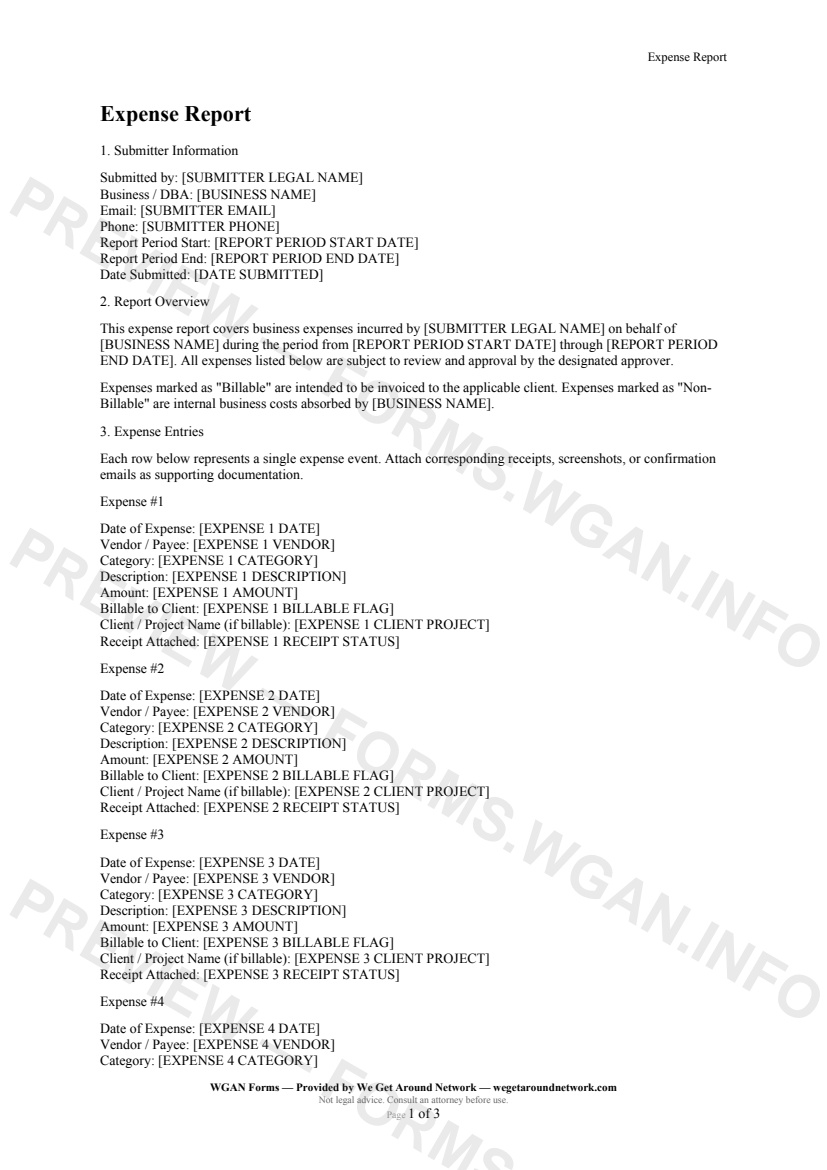
Expense Report — page 1 preview covering Submitter Information, Report Overview, Expense Entries
Page 1
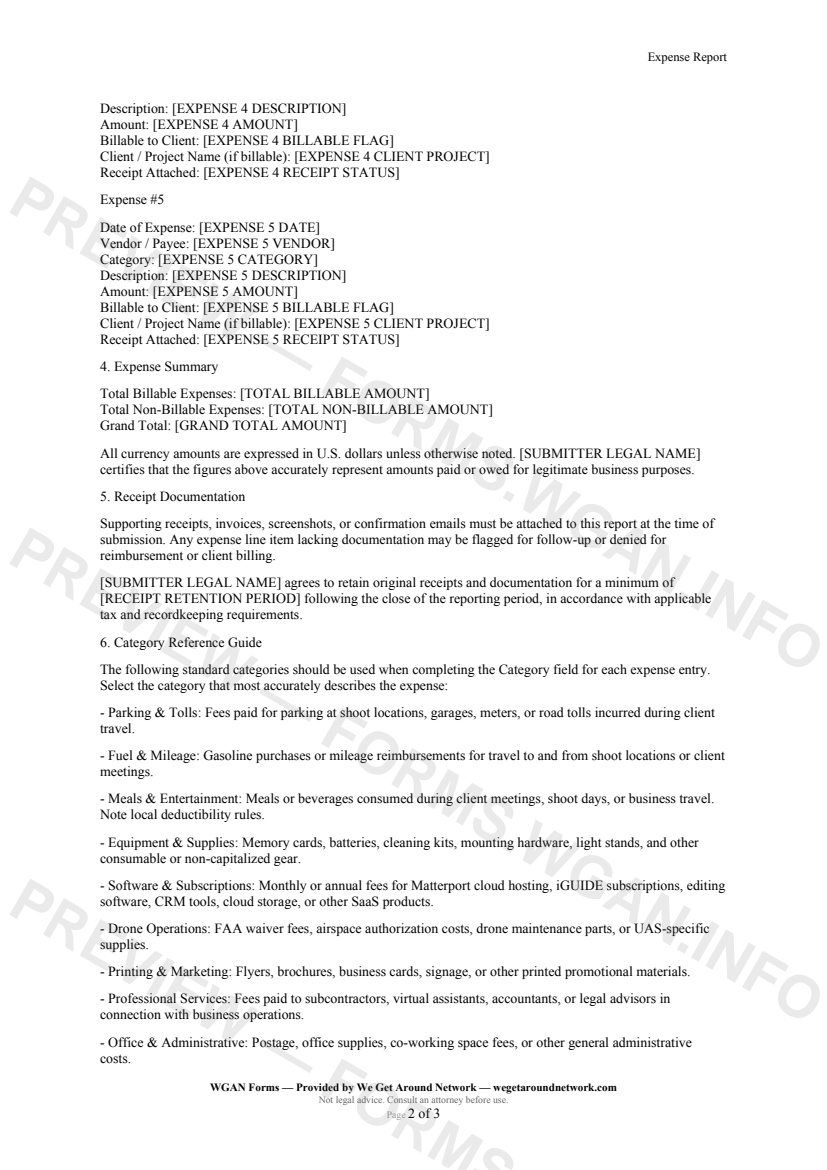
Expense Report — page 2 preview covering Receipt Documentation, Category Reference Guide, Certification and Signature
Page 2

First 2 pages shown — watermarked. Subscribe to fill out and download the unbranded document.

What this form covers

Submitter Information

The report opens by capturing the submitter's legal name, business or DBA name, email, and phone number alongside the exact reporting period dates — giving finance teams and solo operators a clean audit trail from the very first line.

Expense Entries

Up to five individual expense lines are included, each collecting:

  • **Date** of the expense - **Vendor / Payee** name - **Category** (chosen from a 10-option standardized list) - **Description** of the business purpose - **Amount** in USD - **Billable flag** — Yes (Billable) or No (Non-Billable) - **Client / Project name** when the expense is to be passed through - **Receipt status** — attached, available on request, or unavailable

This structure keeps every charge traceable and presentation-ready for client invoices or tax filings.

Category Reference Guide

The built-in category guide covers the expense types most common to real estate media professionals:

  • **Parking & Tolls** — shoot-day travel costs - **Fuel & Mileage** — driving to listings and client meetings - **Software & Subscriptions** — Matterport cloud, iGUIDE, editing suites, CRM tools - **Drone Operations** — FAA fees, airspace authorization, UAS maintenance - **Equipment & Supplies** — batteries, memory cards, consumable gear - **Meals & Entertainment, Printing & Marketing, Professional Services**, and more

Expense Summary

A dedicated summary section tallies **total billable**, **total non-billable**, and a **grand total** — exactly what your bookkeeper or client needs to reconcile charges at month end.

Approver Use Only

A locked approver section captures the reviewer's name, approval date, notes, approved reimbursement amount, and final report status (Approved – Full, Approved – Partial, Returned for Correction, or Denied), making this form usable by solo photographers and multi-person teams alike.

Table of contents

  1. Submitter Information
  2. Report Overview
  3. Expense Entries
  4. Expense Summary
  5. Receipt Documentation
  6. Category Reference Guide
  7. Certification and Signature
  8. Approver Use Only

What's included

  • Structured per-expense entry fields with vendor, date, and amount
  • Client-billable vs. non-billable flag on every expense line
  • Ten standard categories tailored to real estate photography businesses
  • Receipt attachment tracking and retention period commitment
  • Billable and non-billable subtotals plus grand total summary
  • Submitter certification and acknowledgment of accuracy
  • Approver-only section for review, notes, and status tracking
  • Covers parking, tolls, meals, software subscriptions, and drone costs
#expense#report#internal#business

Fill out this form

Subscribers only

Subscribe at $19/mo (or $149/yr) to fill any form online and download the completed PDF unlimited.

Sign in to subscribeSee pricing

Related forms in Internal Operations

Other templates capture pros use alongside this one.

See all in Internal Operations →
Internal Operations

W-9 Collection Form

An internal cover sheet and tracking checklist real estate photographers use to collect, log, and file W-9 tax forms from subcontractors, second shooters, and vendors for accurate 1099 reporting.

#w9#tax#internal
View form
Internal Operations

Internal Incident Damage Report

A structured internal incident and damage report for real estate photographers, drone operators, and 3D tour providers to document equipment damage, property damage, or safety incidents during a shoot.

#incident#damage#report
View form
Internal Operations

Mileage Log

IRS-compliant personal-vehicle mileage log for real estate photographers and proptech professionals to track business-travel deductions year-round.

#mileage#log#tax
View form
Internal Operations

Employee Contractor Onboarding Checklist

A step-by-step internal onboarding checklist for real estate photography businesses hiring second shooters, editors, or admin staff — covering paperwork, equipment, access, and first-shoot pairing.

#onboarding#employee#checklist
View form