We Get Around NetworkForms
Browse FormsPricingAbout
Sign inGet started
We Get Around Network

WGAN Forms

A library of business, legal, and operational templates built for real estate photographers, Matterport service providers, 3D capture specialists, and proptech professionals.

A product of We Get Around Network — the largest global community for real estate photographers and 3D capture pros.

Library

  • Browse forms
  • Pricing
  • Redeem promo code

Company

  • About
  • We Get Around Network
  • Legal disclaimer
  • Terms
  • Privacy

Disclaimer: All forms provided are templates for informational purposes only and do not constitute legal advice. Consult a qualified attorney before using any agreement in your business.

© 2026 We Get Around Network. All rights reserved.

Back to library
Internal Operations

KPI Metrics Tracker

A monthly KPI metrics tracker for real estate photographers and proptech professionals to monitor bookings, revenue, turnaround, reviews, referrals, and growth trends.

Last updated Jul 7, 2026

Disclaimer: This template is for informational purposes only and is not legal advice. Have a qualified attorney review it before use.

What is the KPI Metrics Tracker?

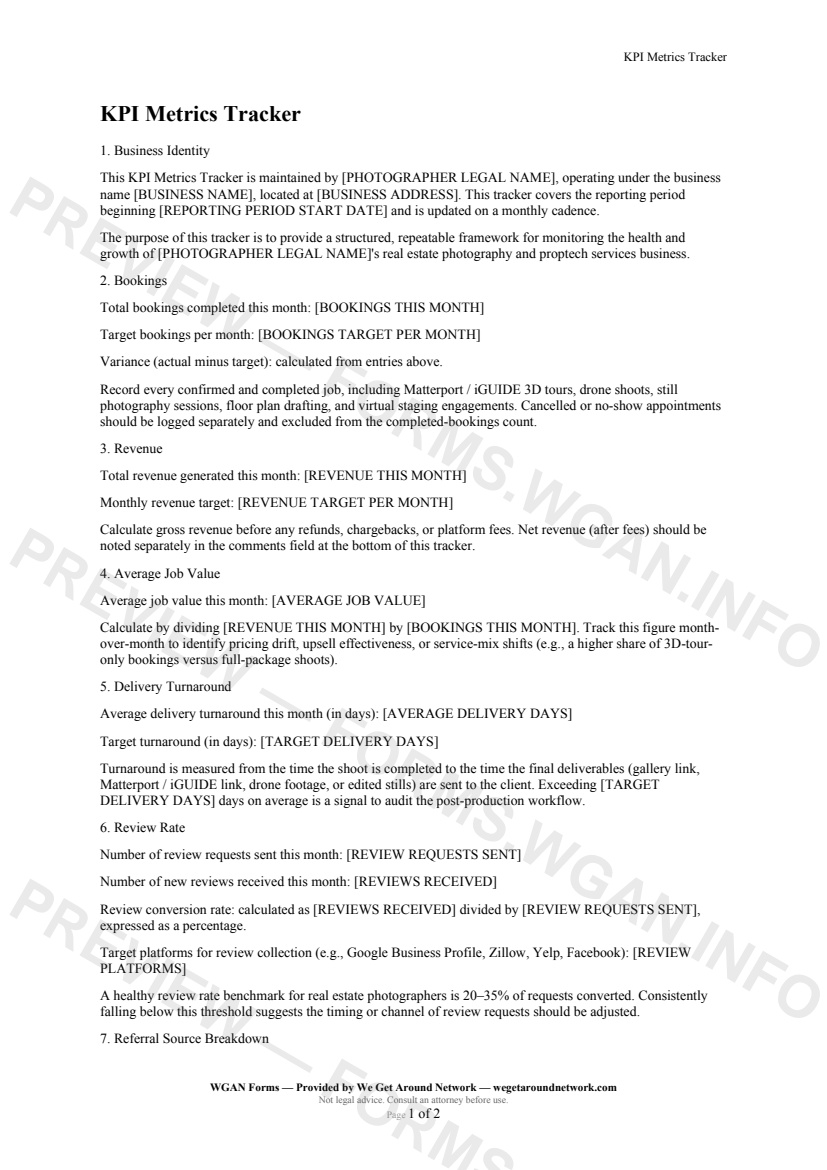
The KPI Metrics Tracker is a structured monthly reporting template designed for real estate photographers, 3D tour creators, and proptech professionals. It captures ten core business dimensions — from bookings and gross revenue to delivery turnaround, review rates, and referral source breakdowns — in a single standardized record. Each monthly snapshot is anchored to a specific business identity and reporting period, making figures directly comparable across months and years without ambiguity.

When should you use this form?

The KPI Metrics Tracker is most useful at the close of each calendar month, when a photographer or reality-capture operator wants to compare actual bookings, revenue, and turnaround time against pre-set targets. It is also appropriate when onboarding a new service line such as Matterport 3D tours, iGUIDE walkthroughs, or drone aerials, and when preparing for a quarterly business review or year-end tax and growth analysis.
What's included in this template?

  • Business identity fields: legal name, trade name, address, and reporting period start date
  • Bookings log: completed jobs, monthly target, cancellations, and no-shows
  • Revenue section: gross revenue before fees, monthly target, and variance
  • Average Job Value (AJV) field calculated from gross revenue divided by completed bookings
  • Delivery turnaround tracker: actual average days versus SLA target
  • Review rate section: requests sent, reviews received, conversion rate, and platform breakdown
  • Referral source breakdown across five channels: agent/broker, past-client, SEO, social media, and other
  • Month-over-month growth trends, goals, action items, and comments/notes fields

How do I fill out this form?

  1. Open the form at forms.wgan.info. Navigate to forms.wgan.info and locate the KPI Metrics Tracker template. Click the form to open the online fill-in interface in your browser — no account login is required to begin.
  2. Enter business identity and reporting period. Type your legal business name, trade name, address, and the exact start date of the monthly reporting period into the Business Identity section to anchor the snapshot to a specific month.
  3. Fill in bookings, revenue, and AJV fields. Log completed job count, cancellations, and gross revenue, then enter your pre-set monthly targets for each. The Average Job Value field calculates automatically from revenue divided by completed bookings.
  4. Complete turnaround, reviews, and referral sections. Enter actual average delivery days versus your SLA target, record review requests sent and received per platform, and distribute this month's bookings across the five referral source channels.
  5. Add growth trends, goals, and action items. Fill in month-over-month growth observations and write at least three specific, measurable action items for the coming month in the Goals and Action Items section.
  6. Download and save the completed tracker. Click the download or export button to save the completed KPI Metrics Tracker as a PDF or your preferred format. Store it in a dedicated monthly folder for easy year-over-year comparison.

Preview

KPI Metrics Tracker — page 1 preview covering Business Identity, Bookings, Revenue
Page 1
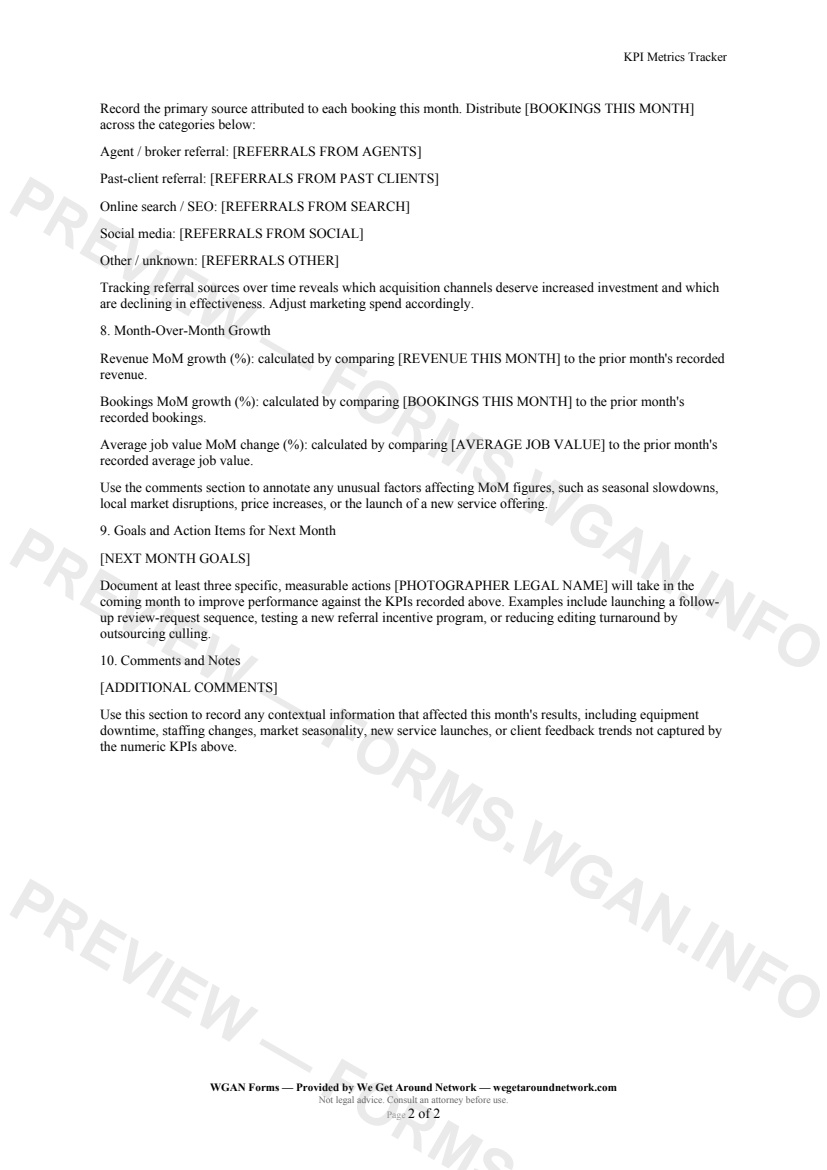
KPI Metrics Tracker — page 2 preview covering Review Rate, Referral Source Breakdown, Month-Over-Month Growth
Page 2

First 2 pages shown — watermarked. Subscribe to fill out and download the unbranded document.

What this form covers

Business Identity

The tracker opens by anchoring every monthly snapshot to your business — legal name, trade name, address, and the exact start date of the reporting period. One clean record per month means your data stays comparable over time with no ambiguity about which period a figure belongs to.

Bookings

Log your completed job count against a pre-set monthly target. The form separates confirmed-and-completed sessions from cancellations and no-shows so your conversion and capacity metrics stay clean. Whether you shoot Matterport 3D tours, iGUIDE walkthroughs, drone aerials, or traditional still packages, every service type counts toward a single bookings figure.

Revenue & Average Job Value

Record gross revenue before platform fees or refunds, then compare it to your monthly target at a glance. The **Average Job Value** field — gross revenue divided by completed bookings — is one of the most telling single numbers in a photography business. A rising AJV signals successful upselling or a healthier service mix; a falling AJV is an early warning before revenue problems become serious.

Delivery Turnaround

Enter your actual average turnaround in days alongside your target. The tracker flags when you are drifting beyond your own SLA — a signal to audit culling, editing, or delivery workflows before clients notice.

Review Rate

  • Track how many review requests you sent and how many reviews you actually received - Calculate your conversion rate automatically - Log which platforms (Google Business Profile, Zillow, Facebook, etc.) are generating responses

Referral Source Breakdown

Distribute this month's bookings across five channels: agent/broker referrals, past-client referrals, organic search/SEO, social media, and other/unknown. Over time this breakdown tells you exactly where to invest your next marketing dollar.

Goals and Action Items

Close every monthly review with at least three specific, measurable actions for the coming month — keeping the tracker an active management tool rather than a passive scoreboard.

Table of contents

  1. Business Identity
  2. Bookings
  3. Revenue
  4. Average Job Value
  5. Delivery Turnaround
  6. Review Rate
  7. Referral Source Breakdown
  8. Month-Over-Month Growth
  9. Goals and Action Items for Next Month
  10. Comments and Notes

What's included

  • Monthly bookings tracking against a personal target
  • Gross revenue logging with a monthly goal comparison
  • Average job value calculation and trend monitoring
  • Delivery turnaround benchmarking against your SLA
  • Review request volume and conversion rate tracking
  • Five-channel referral source attribution breakdown
  • Month-over-month growth calculations for key metrics
  • Structured goal-setting and action-item planning section
#kpi#metrics#tracker#internal

Fill out this form

Subscribers only

Subscribe at $19/mo (or $149/yr) to fill any form online and download the completed PDF unlimited.

Sign in to subscribeSee pricing

Related forms in Internal Operations

Other templates capture pros use alongside this one.

See all in Internal Operations →
Internal Operations

W-9 Collection Form

An internal cover sheet and tracking checklist real estate photographers use to collect, log, and file W-9 tax forms from subcontractors, second shooters, and vendors for accurate 1099 reporting.

#w9#tax#internal
View form
Internal Operations

Internal Incident Damage Report

A structured internal incident and damage report for real estate photographers, drone operators, and 3D tour providers to document equipment damage, property damage, or safety incidents during a shoot.

#incident#damage#report
View form
Internal Operations

Mileage Log

IRS-compliant personal-vehicle mileage log for real estate photographers and proptech professionals to track business-travel deductions year-round.

#mileage#log#tax
View form
Internal Operations

Employee Contractor Onboarding Checklist

A step-by-step internal onboarding checklist for real estate photography businesses hiring second shooters, editors, or admin staff — covering paperwork, equipment, access, and first-shoot pairing.

#onboarding#employee#checklist
View form