We Get Around NetworkForms
Browse FormsPricingAbout
Sign inGet started
We Get Around Network

WGAN Forms

A library of business, legal, and operational templates built for real estate photographers, Matterport service providers, 3D capture specialists, and proptech professionals.

A product of We Get Around Network — the largest global community for real estate photographers and 3D capture pros.

Library

  • Browse forms
  • Pricing
  • Redeem promo code

Company

  • About
  • We Get Around Network
  • Legal disclaimer
  • Terms
  • Privacy

Disclaimer: All forms provided are templates for informational purposes only and do not constitute legal advice. Consult a qualified attorney before using any agreement in your business.

© 2026 We Get Around Network. All rights reserved.

Back to library
Internal Operations

Shoot Day Call Sheet

A shoot-day call sheet for real estate photographers and 3D tour crews covering crew contacts, call times, shot lists, and equipment manifests for a single property shoot.

Last updated Jul 7, 2026

Disclaimer: This template is for informational purposes only and is not legal advice. Have a qualified attorney review it before use.

What is the Shoot Day Call Sheet?

The Shoot Day Call Sheet is a single-property shoot planning document for real estate photographers, 3D tour operators, and reality-capture crews. It consolidates crew contacts and call times, property access details, a checkbox-driven shot list, and a full equipment manifest into one shareable reference. The form covers every common real estate media deliverable — stills, Matterport or iGUIDE scans, drone photography, video walkthroughs, virtual twilight edits, and floor plans — alongside post-shoot reminders and a crew acknowledgement signature block.

When should you use this form?

The Shoot Day Call Sheet is appropriate any time a real estate media shoot involves more than one crew member, multiple deliverable types, or a property where access logistics are non-trivial. Use it before sending crew to a vacant listing with a lockbox, a luxury property requiring gate codes and parking instructions, or any job where a drone operator, assistant, or 3D scanner technician is joining the lead photographer on site.
What's included in this template?

  • Shoot overview with lead photographer name, company, and primary contact details
  • Property address, listing agent contact, and dedicated access notes field for lockbox and gate codes
  • Crew roster with individual named call times, shoot duration, and wrap time
  • Three-tier contact tree with lead, listing agent, and emergency backup contacts
  • Access wait threshold defining when the photographer may reschedule
  • Checkbox-driven shot list covering stills, 3D tours, drone, video, virtual twilight, and floor plans
  • Equipment manifest itemizing camera bodies, lenses, lighting, 3D scanner serial number, drone FAA registration, and memory cards
  • Post-shoot reminders and crew acknowledgement signature block

How do I fill out this form?

  1. Open the form at forms.wgan.info. Navigate to forms.wgan.info and locate the Shoot Day Call Sheet template in the library. Click the template to open the online form in your browser — no account or software installation is required.
  2. Enter shoot overview and property details. Fill in the shoot date, lead photographer legal name, company or DBA, and primary contact information. Then complete the property address, listing agent name, and all access notes including lockbox codes, gate codes, and parking instructions.
  3. Build the crew roster and contact tree. Add each crew member's name and role — lead photographer, assistant, drone operator, or specialist — and assign an individual call time. Enter the three-tier contact tree and set the access wait threshold in minutes.
  4. Check off deliverables on the shot list. Work through the checkbox shot list and select every deliverable type scheduled for the shoot, including 3D scan areas, drone FAA authorization status, video format notes, and any custom deliverables specific to the listing.
  5. Complete the equipment manifest. Itemize all gear being brought to the property: camera bodies, lenses, lighting, tripod, 3D scanner model and serial number, drone FAA registration number, batteries, memory cards, and any miscellaneous accessories.
  6. Download and distribute the completed call sheet. Review all entries for accuracy, then use the download option to save the completed call sheet as a PDF. Share the file with all crew members and the listing agent before shoot day.

Preview

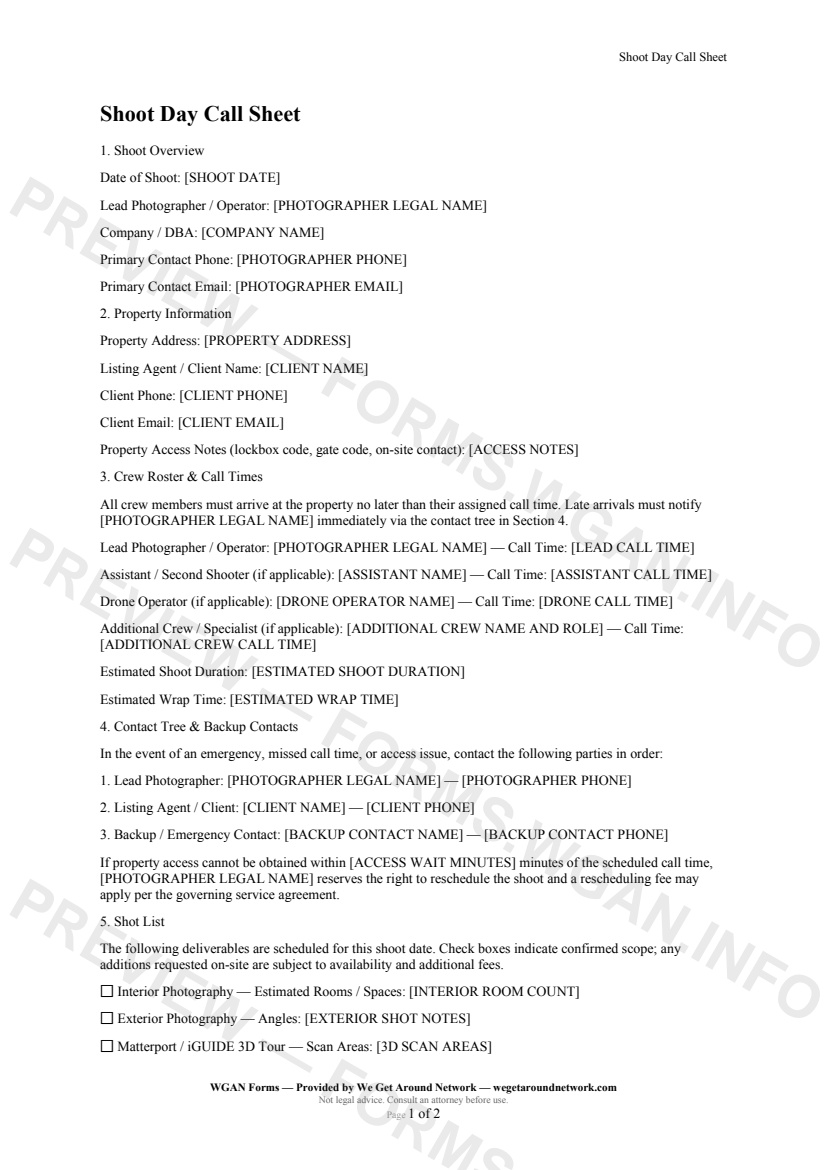
Shoot Day Call Sheet — page 1 preview covering Shoot Overview, Property Information, Crew Roster & Call Times
Page 1
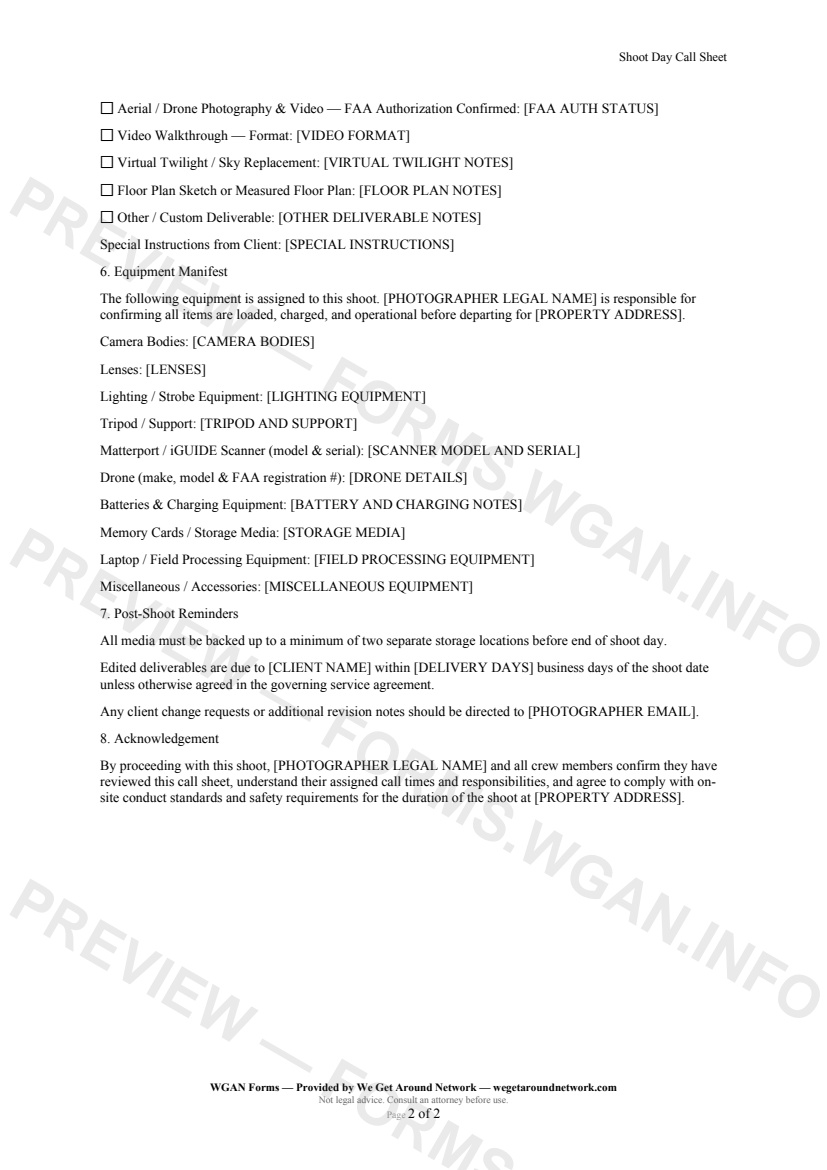
Shoot Day Call Sheet — page 2 preview covering Shot List, Equipment Manifest, Post-Shoot Reminders
Page 2

First 2 pages shown — watermarked. Subscribe to fill out and download the unbranded document.

What this form covers

Shoot Overview

Every shoot starts with the basics locked in. The call sheet opens by capturing the **shoot date**, the **lead photographer or operator's legal name**, company / DBA, and primary phone and email — so there is one unambiguous source of truth for everyone arriving on site.

Property Information & Access

The property section records the **full property address**, listing agent or client name, and all contact details. A dedicated **Access Notes** field holds lockbox codes, gate codes, parking instructions, and any on-site contact information — so no crew member has to call around at 8:55 AM looking for the keycode.

Crew Roster & Call Times

Each crew role — lead photographer, assistant / second shooter, drone operator, and any additional specialist — gets its own **named call time** line. Estimated shoot duration and wrap time are also recorded, giving everyone a shared schedule from the moment they open the document.

Contact Tree & Backup Contacts

The contact tree lists three tiers of escalation:

  • Lead photographer - Listing agent / client - Backup / emergency contact

An **access wait threshold** (in minutes) defines exactly when the photographer is entitled to reschedule, protecting both parties and removing ambiguity.

Shot List

A checkbox-driven shot list covers every deliverable type in the real estate media toolkit:

  • Interior and exterior photography - Matterport / iGUIDE 3D tour with scan areas - Aerial / drone photography (with FAA authorization status) - Video walkthrough with format notes - Virtual twilight / sky replacement - Floor plans and custom deliverables

Equipment Manifest

Camera bodies, lenses, lighting, tripod, 3D scanner model and serial number, drone FAA registration, batteries, memory cards, field processing gear, and miscellaneous accessories are all itemized — so nothing is left on the garage shelf when you're an hour away.

Table of contents

  1. Shoot Overview
  2. Property Information
  3. Crew Roster & Call Times
  4. Contact Tree & Backup Contacts
  5. Shot List
  6. Equipment Manifest
  7. Post-Shoot Reminders
  8. Acknowledgement

What's included

  • Shoot date, lead operator, and company info
  • Full property address and client contact details
  • Crew roster with individual call times
  • Prioritized contact tree and backup emergency contacts
  • Access wait threshold and rescheduling trigger
  • Itemized shot list for all service types
  • Drone FAA authorization status field
  • Complete equipment manifest with serial number tracking
  • Post-shoot backup and delivery reminders
  • Crew acknowledgement of responsibilities
#call-sheet#shoot-day#internal#workflow

Fill out this form

Subscribers only

Subscribe at $19/mo (or $149/yr) to fill any form online and download the completed PDF unlimited.

Sign in to subscribeSee pricing

Related forms in Internal Operations

Other templates capture pros use alongside this one.

See all in Internal Operations →
Internal Operations

W-9 Collection Form

An internal cover sheet and tracking checklist real estate photographers use to collect, log, and file W-9 tax forms from subcontractors, second shooters, and vendors for accurate 1099 reporting.

#w9#tax#internal
View form
Internal Operations

Internal Incident Damage Report

A structured internal incident and damage report for real estate photographers, drone operators, and 3D tour providers to document equipment damage, property damage, or safety incidents during a shoot.

#incident#damage#report
View form
Internal Operations

Mileage Log

IRS-compliant personal-vehicle mileage log for real estate photographers and proptech professionals to track business-travel deductions year-round.

#mileage#log#tax
View form
Internal Operations

Employee Contractor Onboarding Checklist

A step-by-step internal onboarding checklist for real estate photography businesses hiring second shooters, editors, or admin staff — covering paperwork, equipment, access, and first-shoot pairing.
#onboarding#employee#checklist
View form